Wednesday, November 17, 2010

A Cheap Way to Integrate Twitter and CRM

As you may know there is a Social Networking Accelerator for CRM which integrates Twitter and Dynamics CRM 4.0:

http://crmaccelerators.codeplex.com/releases/view/29979

However, since Twitter changed their authentication method to OAuth a few months ago, the accelerator has been broken. This is a shame because it is quite a powerful little beast.

Wanting to bring tweets into CRM, for various reasons, I’ve devised this workaround.

TwInbox

TwInbox is a great add-on to Outlook. When my Twitter rss feeds in Outlook died (because of the shift to OAuth) I needed to find an alternative way of getting my tweets into Outlook. While there are twitter clients out there, if it isn’t in my pst file, I don’t get a chance to read it. This is where TwInbox came in.

You can download TwInbox here:

http://www.techhit.com/TwInbox/twitter_plugin_outlook.html

Once installed, you can basically add as many Twitter accounts as you like to it and they will come into folders in a location you specify:

TwInbox_folder_layout

You can then use Outlook to manage them as you wish.

Leveraging Outlook

What would be ideal would be to use CRM Outlook tracking to bring the tweets into Dynamics CRM. Unfortunately the tweets are of a type ‘Post’ and tracking won’t work with Posts.

However, we can forward a Post, which turns it into an email. Armed with this knowledge, there are a few options:

  1. Forward the tweet to a queue in CRM for processing
  2. Forward the tweet to a dummy account/contact record so that it tracks into the history of that account/contact

Going down the second path, I set up an account in CRM called ‘Twitters’. I also gave it a bogus email address. Now when I forward the tweet, marking the resulting email as tracked, it appears in the history of the Account. I’ll get a bounce but I can manage this through outlook rules, for example.

image

From here, I can open the email and, using the convert buttons, turn this into a Lead, Case or Opportunity.

If you went down the first path, the email would end up in the queue where someone could accept it and also convert it into a Lead, Case or Opportunity.

Will this Work in the IE Client?

No, this trick relies on the power of Outlook add-ons to bridge the gap between Twitter and CRM. However, given the deeper hooks CRM has into Outlook in the next version, I can see Outlook add-ons becoming more and more powerful at providing functionality indirectly to Dynamics CRM.

Enjoy!

Saturday, November 6, 2010

Dynamics CRM Resources for the Rest Of Us

There is a lot of information out there for Dynamics CRM but it is sometimes hard to find good information aimed at users or non-technical administrators. I wrote an article of resources a little over a year ago (http://leontribe.blogspot.com/2009/08/handy-links-for-non-technical-crm.html) and thought it was time to give it a bit of an update.

Within Dynamics CRM

For this section, I’ll use screenshots from Dynamics CRM 2011 beta (http://www.crm2011beta.com ) but you can find the same resources in the same places in Dynamics CRM 4 (except for the first one which is only available in CRM 4 Online). One thing to consider with the resources within Dynamics is that they only refer to features found in CRM out-of-the-box. Other than the “Help on This Page” which is customisable, the rest will not refer to any configurations or customisations done to your instance of CRM.

Getting Started

image

The getting started area is available at the top of most list view screens in CRM. For a user starting out it gives lots of handy tips and tricks. If you are a little more experienced with CRM you can hide this with the little up-arrow at the bottom of the getting started pane.

“Help On This Page”

Every out-of-the-box page in CRM has a ‘Help on This Page’ feature. To access this look for the white question mark in a blue circle in the top right of the screen image

In CRM 4, once you click this you need to specifically select ‘Help on this Page’. In CRM 2011 it goes there by default.

image

As can be seen, this is a little more comprehensive than the Getting Started pane and worth a browse if you’re not sure about a feature or want to know what a field is for.

Resource Center (http://rc.crm.dynamics.com/rc/regcont/en_us/ophighlights.aspx )

One of the best and least utilised features of Dynamics CRM. I have taught ‘refresher training’ to classes of CRM veterans before and asked them the question “Where can you find the Resource Center?” and been overwhelmed with silence. I have even been accused of adding it just before the training session as users insist it was not there before. For those that still are unsure, the Resource Center can be found at the web address above, or by clicking the button, just below Settings, clearly marked “Resource Center”.

image

This is the “Google”, sorry I mean the “Bing”, of CRM resources. Open up the page and you are greeted with all sorts of online resources.
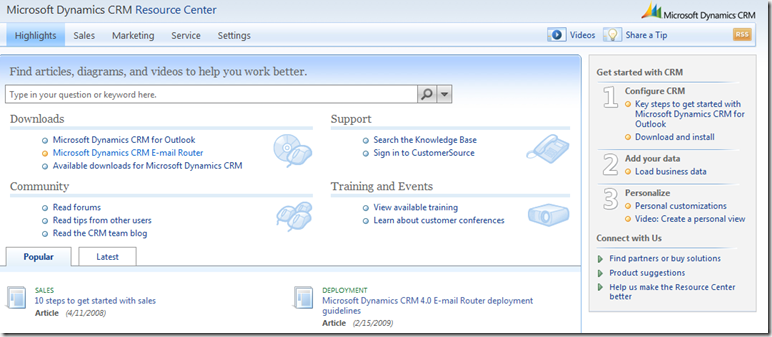
image

Type something into the search box and you’ll be given help sections, videos, forum discussions and all sorts of things.

The Forums

If you have questions which you cannot answer using the resources within CRM, my next port of call would be ‘The Forums’. These are online discussion areas full of people who use, make money implementing or design Dynamics CRM (yes, the teams at Microsoft involved with Dynamics CRM are active participants on the forums). This is as good as it gets in terms of free, professional support for Dynamics CRM.

The forums are also one of the measures used in determining whether a Microsoft MVP is actively engaged in the community so us MVPs have a vested interest to ensure we are active in the forums and providing good answers in a timely fashion (because if we don’t someone else will).

Activity in the forums is so good that if you are asking a non-technical user kind of question e.g. “How can I add an attachment to an email?” you are likely to get a response within hours, if not minutes, not days.

The CRM Forum (http://social.msdn.microsoft.com/Forums/en-US/crm/threads )

This is arguably the most popular and most active of the forums. There are actual three main forums (CRM, Deployment and Development) therefore CRM tends to get more user-type questions than the other two, although the rule is not hard and fast and you will sometimes get dev-type questions posted.

Dynamics ‘Ask the Community’ page (http://community.dynamics.com/product/crm/f/117.aspx )

This is not as active as the main forum but does still get some activity and worthy of a search if the main forum does not come through with the goods. There is talk of this being rolled into the main forum but nothing has happened as of yet.

CRM Online Forum (http://social.msdn.microsoft.com/Forums/en-US/crmonline/threads )

I did not mention this before as I am mentioning it here. The main CRM forum is for any question on Dynamics CRM regardless of deployment, the CRM Online forum is specifically for online deployments of Dynamics CRM 4, although questions do arise on there which apply to CRM in general. If your question is online-specific, this is a good place to go.

CRM 2011 Beta Forum (http://social.microsoft.com/Forums/en-US/crm2011beta/threads )

This is similar in purpose to the CRM Online Forum, except specifically for Dynamics CRM 2011 beta. If the new version is of interest, I strongly encourage you to sign up for the online beta at http://www.crm2011beta.com .

CRM Public Forum (http://groups.google.com/group/microsoft.public.crm/topics?hl=en )

Microsoft have made it clear that they no longer are active in the public forums and encourage people to go to the main CRM forum. Certainly the main activity on the public forums these days are non-CRM related advertisements. However, as a historical resource for Dynamics CRM it is worth a search if others have failed you.

Blogs and Twitters

There are many, many blogs and twitters out there dedicated to Dynamics CRM. Here are a couple whose content is often not as technical as others.

Dynamics CRM Team Blog (http://blogs.msdn.com/b/crm/) and Twitter (http://twitter.com/MSDynamicsCRM)

Yes, this is the blog and twitter of THE Dynamics CRM Team at Microsoft HQ in Redmond. While technical articles do appear, there are also plenty of ‘how to’ and ‘here is a feature you may not know about’ type of articles which can keep you using Dynamics CRM to its full potential.

Leon Tribe’s Blog (http://leontribe.blogspot.com) and Twitter (http://twitter.com/leontribe)

It would be remiss of me not to mention my own blog and twitter. While I was a developer a long time ago, my focus these days is on the functional aspects of CRM. Therefore my blog generally has articles on codeless solutions to common problems or general CRM-related articles of interest. It is rare to see code or discussions on things like plugins on my blog.

My tweets are again designed for broad-audience appeal. Often they are links to interesting videos (I have many links at the moment on CRM 2011), the latest service pack or industry analysis on the CRM market. Check them out and if they’re not to your liking, there are many, many others out there, some of which got plugged in my blog post from last year.

Conclusion

There are plenty of resources out there to help you work with and administer Dynamics CRM. If all else fails, reach out to an MVP. We love the opportunity to help people realise their full potential with Dynamics CRM and as long as we can answer your question in an email or 15 minute conversation, you’re almost certainly not going to get an invoice for it.  

Wednesday, November 3, 2010

Dynamics CRM Statement of Direction September 2010

First of all, I have no idea why a statement of direction for September is being released in November, but there it is. But enough of such quibbles, what are the nuggets of gold?

If you want to read the document itself, here is the link:

http://cid-4d66c5ae1389f5d8.office.live.com/self.aspx/Public/Dynamics%20CRM%204.0%20information/CRM%5E_StatementOfDirection%5E_September%202010%5E_final.pdf#resId/4D66C5AE1389F5D8!1695

Release Dates

The release has stretched to Q1 2011. While the previous noise has been Q4 2010 i.e. before December, the statement of direction is clear.

Deployment Options

The three we know about are stated (online with Microsoft, online with a hosting partner, on-premise). They also say you can move from online to on-premise. They don’t promise the other way around though.

Features of Dynamics CRM 2011

There is a bunch of pages on the features of Dynamics CRM 2011. I won’t rehash them here but if you want to know what is in the new version, look at my twitter feed for some excellent information.

http://www.twitter.com/leontribe

For a comprehensive look, I can recommend Eric Boocock’s two-hour run through.

http://bit.ly/ahpRMo

System Requirements

Client requirements:

  • IE 7 or above (sorry no support for other web browsers)
  • Office 2007 or above if using the Outlook client (trust me, you want to be using the Outlook client with the new version)

Server requirements:

  • 64-bit ONLY (no 32-bit server support here) for the OS and SQL server

The Accelerators

Microsoft has been reasonably tight-lipped on the story with the accelerators. The Statement of Direction gives some guidance.

The following accelerators have been made part of the standard product:

  • Extended Sales Forecasting (the excellent sales goals stuff in the new version)
  • Workflow Tools (really? I’ve seen no difference in the 2011 beta)
  • Business Data Auditing
  • Analytics (They are probably referring to the sock-blowing visualisations and dashboarding functionality of CRM 2011)

The following will be released as Solutions for the new version:

  • Event Management
  • eService
  • Notifications
  • Newsfeed
  • Social Networking (hopefully they will fix Twitter integration which is currently broken)
  • Partner Relationship Management
  • Customer Case Accelerator
  • Non-Profit Accelerator

I’m very excited about these being released as Solutions as the v4 accelerators have varying degrees of difficulty to install. The Solution packaging should remove a lot of those headaches.

NO MORE CODEPLEX!

Traditionally, Codeplex has been the home of the CRM accelerators. This will change with the new versions which will be located on the CRM marketplace:

http://www.microsoft.com/dynamics/marketplace

Solutions and the Marketplace

Reading the Statement of Direction there will be two categories of solutions offered:

  • Free and not officially supported (community solutions)
  • Free or charged supported solutions (certified solutions)

Before there is an outcry that Microsoft are feathering their nest through the ‘Certified for Microsoft Dynamics’ program, there are tools available such as this (http://bit.ly/9ptJho ) which should help.

ERP Integration

The GP integration tool will be updated for CRM 2011 around the time CRM 2011 is released i.e. the start of next year.

The AX6 and NAV 2009 R2 adapters will be out in the second half of next year.

Conclusion

The last bit of the document advertises the international availability of CRM 2011 Online and the Solutions Marketplace.

Overall, the document repeats a lot of what is already out there regarding CRM 2011. conversely, if you are not across what is happening with CRM 2011, this is a good place to start and will be quicker than listening to Eric B. for two hours.

Thursday, October 14, 2010

World First Exclusive: Dynamics CRM 2011 as a Games Platform

You heard it here first, XNA is dead, long live Dynamics CRM 2011. Dynamics CRM 2011 is so powerful you can design games on it. Admittedly the game is hangman in this case but it is possible using the new dialogs feature. As a further testament, this took me about an hour to put together starting from a very low knowledge base of dialogs.

The Structure

First of all I created a new solution in case the boss feels a hangman game is not appropriate for our demo server

image

This way it is really easy for me to remove my work by simply deleting the solution.

Within Hangman there is a new entity called Word and two Dialogs (Hangman Dialog and Hangman!)

The Word Entity

image

The bits of interest are in the Word section (by the way to add a new section, go to insert and look for the column formatting).

Letter 1-6 defines the word of interest, Guess 1-6 stores the state of guessing and Guesses stores the number of incorrect guesses.

The Hangman Dialog

I’ve got multiple screenshots because of the limited scrolling capability within the dialog configuration form.

image

So this Dialog is On-Demand and a Child Process. This works the same way as Workflows. This means I can manually call the Dialog and have it loop.

I did not use the Input Arguments and Variables. To be honest I’m not sure what they do.

First there are a couple of conditional statements. The first sets the Guesses field to zero. The next checks if there have been 10 incorrect guesses and if so it spawns the Hangman! Dialog whose only function is to display the word ‘Hangman!’ and finish the Dialog.

To get a popup, we now create a ‘Page’ step.

image

We prompt for a letter and in the prompt add dynamic information such as the letters correctly guessed so far and the number of Incorrect Guesses. This was really hard to set up because the dynamic fields, just like in version 4 do not always get placed at the cursor. To make matters worse, if I tried to cut and paste a dynamic field it worked but on exiting, the whole text got converted to broken html and I had to start again. My tip for beta: add the dynamic fields first in the order you want them and then type the text around them.

image

After the page prompt a set of if statements checks whether the input value matches any of the letter values and if it does it populates the corresponding Guess field. You can access the user’s input for the conditional pretty much the same way as you access workflow attributes in workflows now i.e. through the form assistant and dropping down the referencing entity to, in this case, Dialog.

image

If the input matches none of the letters, the Guesses field is incremented by one (you can do this in workflows in version 4 but it is a relatively unknown feature. Click on the field and again play with the form assistant. You’ll need to use the default field and set it to one to get the increment working.

Finally I call the Dialog to loop it.

CRM Hangman in Action

First we create a word.

image

We only need to fill in the letter values. The name is not used but is the default attribute for the entity. If desired, the compulsory status could be removed and the field taken off the form.

You then save the record and click the Start Dialog button on the ribbon, selecting the Hangman Dialog

image

You then enter the letter in the text field in the blue area and hit next. The Dialog loops until you have made 10 guesses or until you give up/guess all the letters.

image

Things I Learned

  • You can’t spawn a Dialog from an event, like Workflows. For example, it would have been great to kick off the Dialog on the creation of the Word record. I could not figure out how to do this
  • You cannot spawn a Dialog from a Workflow but you can start a Workflow from a Dialog. I’m guessing this has to do with the asynchronous nature of Workflows
  • Given enough time it should be possible to create an Infocom-style adventure game (http://en.wikipedia.org/wiki/Infocom). I’ll leave that as an exercise for the reader. You’re in a room with exits to the North, South and West…

Wednesday, August 25, 2010

Industry Verticals for Dynamics CRM

I got an email last week from Lauren Carlson of Software Advice (http://www.softwareadvice.com/crm/) referencing an article she wrote about some of the ‘field-tested’ add-ons for Dynamics CRM targeted at specific industries.

http://www.softwareadvice.com/articles/crm/microsoft-dynamics-crm-industry-solutions-our-20-favorites-1082010/

Initially is was 20 but it now appears to have dropped down to 15. I knew about a couple of these solutions but being situated on the bottom of the world there were a whole bunch of them I was not aware of.

If you are in one of the 15 verticals mentioned and wondering how Dynamics CRM can be extended to meet your needs, check out the solutions. Even if you are not based in the USA, these are excellent examples of the flexibility of the Dynamic CRM platform to meet the diverse business needs out in the world.

Thursday, July 29, 2010

CRM 2011: Picking Apart the Demo Video

The Demo

For those of you that don’t already know (you should be following my tweets, then you would). There is an hour-long video going through some of the key enhancements in CRM 2011 (the new name for version 5, pronounced twenty-eleven, like seven-eleven).

Here is a link to a summary and the video itself:

http://bit.ly/9xiUmy

What Bits Got Shown But They Didn’t Mention?

As Andrew Bybee mentions in the video, he could spend another 6-8 hours going through the product it has so much CRM-goodness. I thought I’d have a closer look at some of the screens presented in the video to see what he didn’t have time to get to.

Opportunities

Pickapart1

Things of note:

  • We can mark as won or lost straight from the ribbon. Does this mean no more un-editable popup box for closing?
  • Where are Quotes? (they seem to have moved up to the blue tree thingy in the information section, along with products)
  • History has become ‘Closed Activities’
  • There are things called Connections and no more Relationships.

Connections

pickapart2

Thankfully, Andrew opens up the Connections screen, although the role of ‘friend’ is not set up so he quickly moves on. It seems relationships has been converted to ‘Connections’ and given we can now set up a connection between an email and a user, it seems they’re a bit more generic than before where we could only set up relationships between Accounts, Contacts and Opportunities.

We also have a start and end date on Connections if we want for relationships that don’t last.

Emails

pickapart1_5

Andrew opened up a received email and the thing which I noticed was the ‘CRM Field’ bit on the ‘Show’ section. I cannot imagine what this would do. Does it somehow know the email contains words which came from a CRM database?

pickapart3

By deftly right-clicking on an email in Outlook, Andrew brought up the right-click menu. I noticed the Track in CRM and Set Regarding are now at the bottom. Noice.

pickapart4

When we create a new email, Andrew showed us how to add an Article but we can also add Sales Literature. Finally we can make use of our document repository in CRM (just in time for it to be superseded by the Document feature).

Outlook

pickapart5

They no longer have CRM as a set of sub-folders within mail but have it separated out in its own section. Given the section is given the Organization name, perhaps we can have more than one Organization attached to the client now?

Dashboards

pickapart6

Dashboarding in CRM 2011 is very exciting. What is interesting is they seem to behave like views in that we can have system dashboards and our own dashboards. Looking at the buttons at the top we can also share our dashboards with other users or assign them. We can also set one as the default, suggesting a user-defined default dashboard when entering the area.

No More Preview Pane?

pickapart8_no blue triangle

The blue triangles are gone. No more preview panes?

Extended Process and Dialog Features

pickapart9

The one that stands out for me here is ‘Query CRM Data’. Can we get a response to our dialog and then use this to bring back a value from the CRM database?

Definable Activity Types

pickapart10

In Andrew’s customised solution he has an Activity Type of ‘FanBoard Message’. No more recycling Fax and Letter activities?

pickapart11

It also seems we can add them to queues, promote them to responses and convert them to other entity types like we could the usual activities in version 4.

Dashboards With Grids

pickapart12

In the CRM4Legal solution we must tread carefully as there is code behind some of this but it appears that we can not only add pretty graphs to dashboards but also interactive grids.

Dynamic Lookups

pickapart13

It could be simply a case of some clever jscript but the form allows for a lookup to a company or individual as the client on what appears to be a custom entity. Could CRM 2011 allow us to use the customer lookup as part of our configurations?

There is also a preview-like pane at the top of the record which repeats information seen in the form, most strange.

Conclusions

There is lots to be excited about in CRM 2011 and it will take even seasoned veterans a bit of time to get their heads around all of the features (I’m still reeling at the concept of completely open Connections, do we need N:N any more?). There is no doubt that Microsoft have been listening to the gripes submitted on Connect because so many have been addressed (able to send Sales Literature, a robust call scripting feature in the dialog function, dashboarding etc.)

The open beta is coming out in September and hopefully they will package it up as a VPN or put it online for us to play with. For me, it’s going to be like waiting for Christmas to come only it will be coming twice this year because Microsoft will also be bringing CRM Online to Australia at the end of the year! Perhaps I should get out more.

Monday, July 26, 2010

Dynamics CRM vs Salesforce: User Adoption

Introduction

With the recent announcement of CRM 2011 and the suggestion that it will challenge the dominance of Salesforce, I thought it would be a good time to look at the history of the number of users of both products and how they stack up.

Salesforce

Year Subscribers Customers Average Company size
2009 2,100,000 72,500 29
2008 1,500,000 55,400 27
2007 1,100,000 41,000 27
2006 646,000 29,800 22
2005 393,000 20,500 19
2004 227,000 13,900 16
2003 127,000 8,700 15
2002 76,000 5,700 13
2001 53,000 3,500 15
2000 30,000 1,500 20

image image image

Getting the numbers on Salesforce is pretty easy. Here are my sources:

https://www.salesforce.com/company/milestones/
http://www.salesforcefoundation.org/node/1311/
http://techcrunch.com/2009/02/25/salesforce-hits-1-billion-dollars-in-annual-revenues/
http://www.facebook.com/pages/Salesforce/106458016056856

Salesforce was launched in 1999, according to the first source, if you need a zero data point.

Microsoft Dynamics CRM

Year Subscribers Customers Average
Company size
Jul-10 1,400,000 23,000 61
Apr-10 1,100,000 22,000 50
2009 1,000,000 21,277 47
2008 500,000 11,000 45
2007 400,000 10,000 40

The company size and customers for 2009 is a guess by me as they only said they had reached 1 million subscribers (users). 47 seemed like a reasonable guess.

image image image

Getting the numbers for Dynamics CRM needed a bit more detective work. Here are the sources.

http://www.infinityinfo.com/Microsoft_Dynamics_CRM_Passes_1_Million_Users
http://blog.customereffective.com/?n=42&p=0&s=43
Convergence 2010
http://download.microsoft.com/documents/australia/dynamics/mbs075/postevent/launch_keynote_slides.pdf
https://partner.microsoft.com/download/global/40043170 

Despite being released in 2003, I struggled to find numbers pre-2007.

Things of Note

The first thing that stands out is the average customer size (subscribers/customers). The average Dynamics CRM customer is around 50% larger than its Salesforce equivalent. In both cases the average company size is growing but it is difficult to know whether this is due to both products appealing to larger companies, as they are proven in the market, or whether its simply a case of existing customers increasing the number of employees using the software.

The trend for subscribers and customers, in both cases knows no bounds, suggesting the market is far from maturing, but the average company size, in both cases, does appear to be tapering. In the case of Salesforce, the average company size appears to be approaching 30 and for Dynamics CRM 50 (although the more recent data bucks this trend).

The other thing of note is that Salesforce has a big lead on Dynamics CRM. As of 2009, Salesforce had about twice as many subscribers and three times as many customers. The gap is narrowing though. This can be seen by considering 2008 where Salesforce had three times the subscribers and five times the customers. The gap was less in 2007 (three times the subscribers and four times the customers) but still more than the current position. This suggests Dynamics CRM is catching up.

When (and if) Will Dynamics CRM catch up on Salesforce?

It is an excellent question and very difficult to answer given the rate of growth in both companies knows no bounds. However, we can speculate. Considering the percentage growth of subscribers and users, Salesforce is growing at around 50-60% year on year.

For Microsoft, the data is too patchy. Even if we include the months of release of the statements, we get a bit more data to play with but it is still difficult to get any consistency.

Year Subscribers Customers Average
Company size
Jul-10 1,400,000 23,000 61
Apr-10 1,100,000 22,000 50
Jul-09 1,000,000 21,277 47
Mar-08 500,000 11,000 45
May-07 400,000 10,000 40

The best I could do was feed the data into Excel, assume exponential growth and see where the numbers ended up.

image

The graph says Salesforce will run away from Dynamics CRM. However, given factors such as a finite market size and a changing marketplace, I do not consider this a prediction by any means but it will be interesting to see if Salesforce makes 3,000,000 subscribers by October 2010 and whether Dynamics CRM will make 1,500,000 subscribers by December 2010.

What’s this about a changing marketplace?

One of the assumptions in interpreting the above graph involves the market the two products find themselves. Salesforce has been offering its service worldwide since at least 2003. Dynamics CRM has had an international version since the release of version 4 in December 2007 but a Microsoft-hosted international version is yet to be released. We now know, thanks to the worldwide partner conference, that Dynamics CRM 2011 will be released in 40 markets and 41 languages.

In other words, it can be argued that the growth of Dynamics CRM has been hampered, to date, through a lack of access to the international market which Salesforce already accesses. Alternatively, it could be argued that Salesforce has grown due to a lack of a viable competitor (assuming Dynamics CRM is one). With the release of Dynamics CRM 2011, the two products, in terms of a vendor-hosted CRM solution, will be on equal footing and then it will be easier to make growth comparisons. In fact, it could be argued that with the ‘power of choice’, Microsoft will be able to access markets inaccessible to Saleforce i.e. companies that insist on an on-premise solution.

Conclusions

There is no doubt that Salesforce has a first-mover advantage. They released their software four years before Microsoft and even then, Microsoft did not have a hostable solution until 2007. It will not be until the end of the year that Microsoft will be offering their product internationally and hosted by themselves. If we assume nothing is going to change, it is not obvious how, when, or if Dynamics CRM will catch up.

However, markets are finite, Microsoft have deep pockets, they are notorious for leveraging the ‘stack’ to sell in other Microsoft products and they will soon have a product that competes in the same market as Salesforce. If nothing else, the next 18 months should make for very interesting times.