Saturday, July 23, 2011

Gartner Trajectories of CRM Solutions

Back in April this year I did the ‘Forrester Trajectories of CRM Solutions’ which examined past Forrester reports for CRM in the mid-market and enterprise markets. At the time I struggled to find the Gartner equivalents. With the recent release of Gartner’s Magic Quadrant Report for Sales Force Automation (http://www.crm-guidebooks.com/2011/07/gartner-magic-quadrant-sales-force-automation-july-2011/) I thought I would see if, with the combined power of Google and Bing, I could turn up the quadrants this time around.

In fact I found the past five years of quadrants. Here they are:

image imageimage

imageimage


To Those That Have Fallen, We Salute You

Just like the Oscars I would like to take a moment to remember those products that did not make the 2011 Magic Quadrant. Since 2010 we have lost (cue sentimental piano music…):

  • Cegedim Dendrite (although 2010 was the only year they made an appearance)
  • FrontRange Solutions (GoldMine): located in the ‘niche players’ in the previous four years, they are no longer on the quadrant
  • Maximizer Software: another niche player that is no longer on the Gartner radar
  • Landslide: A ‘visionary’ that had slipped into ‘niche’ last year and unfortunately has fallen off the chart this year

In previous years we also lost off the Gartner quadrant:

  • Infor: last seen as a niche player in 2008
  • Consona: made a once-only appearance in 2008
  • Saratoga Systems: acquired by CDC in 2007, it fell off the radar in 2008
  • Entellium: the company filed for bankruptcy in 2009, bought out by Intuit
  • RightNow Technologies: last seen on the Gartner quadrant in 2007

New Contenders

The only new players to make the quadrant are Microsoft Dynamics CRM Online (the online version of the incumbent on-premise solution) and Zoho (http://www.zoho.com). Zoho is an online applications player based out of India (think of them as a budget Google apps). I have been watching Zoho for a while and, if you are in the market for a basic sales force automation solution, and want other applications like invoicing, simple accounting etc. it is worth looking at. A well deserved addition to the quadrant.

Overall Trends

In the Forrester trajectory post I observed a general trend towards the top right, suggesting all products were improving. This is not as obvious in the Gartner trajectories but what can be seen is a consolidation of products. Counting the number of products in the quadrant over the years we have:

  • 2007: 20
  • 2008: 16
  • 2009: 14
  • 2010: 15
  • 2011: 13

This can also be seen in the number of companies in the quadrant:

  • 2007: 13
  • 2008: 13
  • 2009: 11
  • 2010: 12
  • 2011: 9

In both cases the market has shrunk, in terms of participants, by about 1/3.

The movement of CRM products to the cloud will only, in my opinion, speed this consolidation up. The fact is, for small and medium-sized businesses, with minimal internal IT infrastructure, a cloud CRM offering is very compelling and very affordable. While there will likely always be a market for on-premise deployments (for example in regions with unreliable internet connections) the option of the cloud is becoming more and more acceptable for many organisations. Companies which choose not to offer cloud versions of their products will become more specialised, niche players or fade away.

Also, the barriers are high for new offerings. The combination of low price (and therefore low relative annual turnover) combined with the feature-rich nature of the incumbent products make it very difficult for a new contender to invest on building a competitive product knowing their return on investment will take a significant amount of time.

The future is likely to be dominated by cloud and cloud/on-premise offerings by a small collection of players already in the market.

Individual Product Movements

The products in the Gartner quadrant appear to be a lot more stable than their Forrester counterparts. Significant movements are:

  • Microsoft Dynamics CRM has migrated from a ‘challenger’ to a ‘leader’
  • Oracle CRM On Demand has moved from a ‘visionary’ to a ‘leader’
  • SAP has moved from a ‘niche’ to a ‘challenger’

The good news here is nothing appears to be moving backwards; two major players are now considered leaders in the industry and another is potentially improving. The stagnation of Oracle and the rise of the some of the niche players, such as SugarCRM, Pivotal and SageCRM, seen in the Forrester reports, is not seen in the Gartner reports.

Conclusions

Reviewing the Gartner reports it appears the sales force automation market is consolidating, probably due to the move to the cloud; a trend that will likely continue. While difficult for new contenders to enter the market, Zoho has made an appearance and it will be interesting to see how they fare in future reports.

The one consistency between the two sets of reports is the rise of Microsoft Dynamics CRM. While Forrester considers Microsoft Dynamics CRM the market leader, Gartner still sees salesforce.com as the player to beat. The battle between these two giants is great for consumers as both will work harder to produce the dominant product. It is a great time to be in the CRM industry and I eagerly await future Forrester and Gartner reports to see how the battle plays out.

Saturday, July 16, 2011

Erin Brockovich, Social CRM and Why Chatter is Not a Social Tool

As there is buzz about the cloud (http://leontribe.blogspot.com/2011/07/what-is-cloud.html) there is also a buzz about something called Social CRM. A prevailing wisdom has it that for CRM to be social, you just need to add a tool that looks like Facebook or Twitter. To put it simply, this is a nonsense or, at least, not the complete story.

System vs Philosophy

One of my first blog posts talked about what is CRM (http://leontribe.blogspot.com/2009/01/what-is-crm.html). In essence, I suggested there are two sides to the CRM coin: CRM as a philosophy and CRM as a system. I also suggested that CRM systems do not have to be implemented to anticipate customer need and manage the customer relationship. The idea of an ‘xRM’ system means any number of business processes can be managed through a CRM system.

The same applies to this idea of Social CRM. The philosophy of Social CRM is best explained by a text such as the Cluetrain Manifesto (http://leontribe.blogspot.com/2009/03/all-aboard-cluetrain-its-been-waiting.html). The idea is by engaging with clients in ‘real’ conversations, rather than crafting marketing messages, clients will respond more favourably and, ideally be loyal and buy more. Chris Brogan describes it pretty well (http://www.crm-guidebooks.com/2011/04/social-mediasocial-crm-still-about-people/) and Dr. Graham Hill also summarises the concept of ‘value through engagement’ (http://www.mycustomer.com/topic/social-crm/service-dominant-logic-and-social-crm/125536).

Because it is difficult to go to every client’s house for a ‘cup of tea and a chat’, to assist in engaging clients, systems can be introduced which open channels for two-way conversation. Traditionally CRM system have been focussed on pushing out a message, rather than engaging in a conversation. Social CRM systems seek to remedy this deficit. I explored this topic in my ‘Push and Pull’ post (http://leontribe.blogspot.com/2009/02/push-and-pull-marketing-crm-and-social.html).

Do We Need Systems for Social CRM?

Just as we can engage in a CRM philosophy without a CRM IT system, we can engage in Social CRM without a Social CRM IT system. A great example of this is seen in the movie ‘Erin Brockovich’ (http://en.wikipedia.org/wiki/Erin_Brockovich_(film)). Erin hates lawyers and is not one for process. However, she cares deeply about the people of Hinkley and their plight resulting from contaminated ground water. By engaging the town’s people in a direct, meaningful way she achieves what the lawyers fail to do, obtaining the signatures required to ensure the people get the money they deserve. While the lawyers’ formal, less intimate engagement had caused mistrust and confusion, Erin’s approach gained the trust of the people and made them feel that they were doing the right thing by engaging with her.

However, the movie also illustrates the importance of a systemised approach. When Erin is sick, much of the information, such as contact information, has to be re-obtained by the impersonal lawyers as the only place the information resides is in Erin’s head. With a CRM system in place, this information could be held centrally. The lawyers could get access to the information they need to do their job and Erin could keep them away from the clients.

Do We Need Chatter or Yammer to have a Social CRM System?

Again, not at all. Despite what the doomsayers suggest, e-mail is still an excellent tool for direct communication and is thriving (http://leontribe.blogspot.com/2011/06/is-e-mail-dead-and-is-communication.html). These new ‘collaboration tools’ ultimately allow organisations to use different channels for different kinds of conversation. Interestingly, my own conversations with users of programs like Chatter suggest that, while these kinds of tools do assist in engaging in meaningful conversations with clients, it is not for the reasons you would think. The reason these systems help organisations be more social is because these tools funnel indirect communication away from e-mail. E-mail, along with the telephone, SMS and face-to-face meetings then become the primary channels for direct, meaningful engagement with clients, while the ‘collaboration tool’ is used for general, non-specific impersonal communications (memos), crowdsourcing requests and high-level catching up with distant connections (status updates). In other words, non-essential indirect communication is funnelled through the collaboration tool, letting e-mail be more effective as a one-on-one communication and engagement tool.

Paul Adams, a former researcher at Google, who now works at Facebook has published a slideshow of his research into social networks and how online social tools do not always do a good job of mapping how we interact in the real world (http://www.slideshare.net/padday/the-real-life-social-network-v2). At slide 122, he makes the following statement “Online social networks make it easier to reconnect and catch up with weak ties”. Status updates give us an easy way to see what people are up to. A few slides later he describes online social networks as a “powerful route when sourcing new information”.

What online social networks do NOT do is convert temporary ties (people we interact with only once) to weak ties or weak ties into strong ties. If they did, they would be a truly social tool in the Cluetrain sense. This ‘social conversion’ happens through other channels such as meetings, phone calls and, to a lesser extent, e-mails. This is reinforced on slide 142.

image

This idea that e-mail is reserved for strong, authentic connections is also corroborated on slide 144 where Paul says “Many people use e-mail for very private exchanges…Some young adults use e-mail to communicate with their strongest ties because their (online) social network is overloaded with information.”

The 224 slides are definitely worth browsing as he goes on to talk about how real social networks influence buying habits and how people behave differently on online social networks than in real life interactions.

I understand it may be controversial to suggest a tool like Chatter is not social, but I strongly believe Erin would not have had as much success ‘friending’ Hinkley on Facebook and posting to their wall as she did directly speak directly to the individuals. Chatter would have been great, however, if she was looking for someone in Masry’s law firm who knew something about Hexavalent Chromium or worked on groundwater contamination cases. Chatter aids collaboration but this is not the same as aiding a meaningful two-way conversation. The statistics on the Chatter site confirm this (https://www.chatter.com/why/). The improvements are in areas of collaboration and productivity, but not in areas of client engagement and loyalty.

Conclusions

The philosophy of social CRM is that customer-centric selling can be improved through active and direct engagement with customers. Systems can be put in place to support this. The specific system will depend on the channel in which we intend to engage with the customer. However, if a business implements social tools with no clear vision of their purpose they are wasting their time.

Collaboration tools provide an online channel to engage with others. However, collaboration tools are not synonymous with the concept of a meaningful conversation with a customer or colleague; they simply allow us to share information. The research supports the notion that other channels, such as face to face meetings and e-mails, are still the preferred choice to maintaining strong connections in our networks. To put it another way, if you want to collaborate with people use a tool like SharePoint, Yammer or Chatter; if you want to forge a relationship, pick up the phone or, failing this, send them an e-mail.

Sunday, July 3, 2011

What is the Cloud?

There is a lot of noise about this thing called the cloud and while many people have a basic understanding that it has something to do with running software on the internet I thought it was about time to throw my hat into the ring to try and clear this up.

Starting With The Basics: How Does a PC Work?

Let us cast our mind back to an ancient time when there was no internet. If you wanted to run software, it required your own computer and it went something like this:

image

Let’s start from the bottom and work our way up. A computer has a thing called BIOS. This is the program that starts up when the computer is started. It is hard-wired into the mother board (the big flat circuit board inside your computer) and its job is to start the various bits on the motherboard up and to get the operating system going.

The operating system is, ultimately, software but very special software. The operating system is the gateway between the stuff on the motherboard and the software running on the computer. In this sense it is a platform that all other programs run on.

Software is simply computer programs that run on a computer. Therefore anyone that says ‘no software’ (you know who you are) is talking nonsense because even if a program is running on a server in Singapore and the results are being displayed on a monitor in Boise, Idaho it is still software. Anyone who tells you something different is trying to sell you something.

The hard drive is where all data sits. This includes software, data, music and anything else encoded into 1’s and 0’s.

When a program is run, it is copied into memory and the CPU (which actually does everything by coordinating all the other bits) works with it there. The reason it makes a copy is that memory is faster to read and write to. The reason we don’t abandon the hard drive and make the whole computer memory is cost. This being said, back in the early days of home computers, things like the Commodore 64 or Sinclair Spectrum 48k had no hard drive, just memory (64 kilobytes and 48 kilobytes respectively).

Eventually, when the software does something, it needs to tell the user about it and this is where the screen comes in.

As a disclaimer, I am not an IT graduate, I am a physics graduate that got into IT. Therefore this model may not be completely accurate. However, it has been my working model for the last 25 years and works wonderfully for this article.

Thanks For The History Lesson. What Does This Have To Do With The Cloud?

The thing is, if you understand how a computer works, it is easy to understand the cloud because all the cloud does is replace bits from the computer and use bits somewhere else in the world. Generally speaking, the more you use someone else’s bits, the less control you have on what those bits are. This will become evident as we get into the explanation.

Let us look at some of those cloud terms:

Infrastructure as a Service (IaaS)

This is where we want to run our software on someone else’s machines and they get to say what those machines are. In theory we could hold the software (including the operating system) on our computer and have someone else’s machines read it across the internet but this would be quite slow. So while we are really just using someone else’s hard drive, CPU and memory, we generally also load an operating system and software on the other person’s hard dive for quick access by their CPU and memory. An example of IaaS is Rackspace (http://www.rackspace.com). Rackspace also offer to provide one of a selection of operating systems. Although this could construe as Platform as a Service (see below) because the choice is with us and not them on the operating system, it is still considered IaaS.

If we are just looking to use someone else’s hard drive, this also sits under IaaS and an example of this is Amazon S3 (http://aws.amazon.com/s3/).

Platform as a Service (PaaS)

If we do not get to choose the operating system, this is PaaS. A good example of this is Azure (http://www.microsoft.com/windowsazure/). Here we use someone else’s hard drive, CPU, memory and operating system. We can load whatever software we like onto it and even have it read software sitting on our hard drive if we like. We could also have it read someone else’s hard drive, like Amazon S3. The recent iCloud service by Apple appears to be doing precisely this (http://www.neowin.net/news/icloud-uses-amazon-web-services-and-windows-azure-for-now).

Software as a Service (SaaS)

This is where we get no say on anything other than the specifications of our screen. Someone else chooses the servers, the operating system and the specific software that runs on them. Examples include Hotmail, salesforce.com, Miniclip flash games and Google apps.

What is nice about SaaS is that we do not need to worry about our computing power to get the software to run; it is someone else’s concern. In theory, I could dust off my old Sinclair Spectrum 48k and run a Saas application, which normally takes four or five modern servers to run locally (or on-premise as they now say). All my Speccy has to do is coordinate the information coming from the application, via the internet,  and display it on my monitor or, in the case of the Spectrum, my television. In reality this would not quite work as the Sinclair Spectrum has no way of talking to the internet. The best it could muster in its day was chatting to cassettes. However, the principle is sound.

Conclusion

There is a lot of noise out there about this cloud thing but it really boils down to one simple concept: if you are happy to give up some control to a provider you trust, you can get great technical services with less headache and probably at a lower cost. If this sounds tempting, it is then a case of working out how far you want to go with it. There is no doubt that as these services become more reliable and more feature-rich businesses will take them up more and more, willing to gain an economic edge on rivals in exchange for losing a little control of their IT infrastructure.

Saturday, June 25, 2011

Is E-mail Dead And Is Communication Becoming Social?

This article is again inspired by my clandestine visit to CloudForce last month (http://twitpic.com/4wh1cq). One of the claims in the keynote, which I tweeted at the time, was that social channels are now more popular than e-mail. I found this to be an incredible claim, obviously said to justify Chatter, and I vowed to dig deeper. I attempt to synthesize a lot of information here so the article is quite large. For those of you that want to cut to the chase, feel free to jump to the Conclusions section.

So Where Does This Claim Come From?

The claim seems to come from a Nielsen study from two years ago titled “Global Faces and Networked Places” (http://blog.nielsen.com/nielsenwire/wp-content/uploads/2009/03/nielsen_globalfaces_mar09.pdf). The report talks about how consumers are becoming more social and talks at aspects I mention in my Cluetrain post from the same time (http://leontribe.blogspot.com/2009/03/all-aboard-cluetrain-its-been-waiting.html). The purpose of the study is to justify why advertisers should consider social channels. It is in this context that the claim of popularity is made.

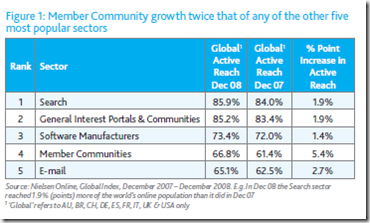
Here is the key table:
image

‘Global Active Reach’ is not clearly defined but seems to mean the browsing internet population (and possibly relates to the percentage of time they spend online and what they do with that time). It is also not clear how they derived these numbers. The definition of ‘Member Communities’ is vague but is said to incorporate “social networks and blogging sites”. So, in essence, the study says that in 2009 more people on the internet accessed social networks and blogs than an online e-mail account. A little surprising but not outrageous.

The study then goes to talk about time online saying people online, in 2009, spent one in every eleven minutes looking at Member Communities. The study does not directly compare relative time spent between Member Communities and e-mail.

Do Other Studies Talk About Time Spent On Internet Activities?

Absolutely. Here is one from February this year (http://www.comscore.com/Press_Events/Presentations_Whitepapers/2011/2010_US_Digital_Year_in_Review).

This one says people are spending more time on Facebook than other places.

image

It also says that people are spending more time online looking at social networking sites than looking at their e-mail (in agreement with Nielsen).

image

It also says the youth are specifically spending less time online checking e-mail.

image

It also mentions 12% of internet time in 2010 was spent on social networking sites, that is, one in every eight minutes (as a comparison to the previous Nielsen statistic of one in every eleven minutes in 2009)

Nielsen also brought out a nice chart showing where all US internet time was devoted in 2010 (http://blog.nielsen.com/nielsenwire/online_mobile/what-americans-do-online-social-media-and-games-dominate-activity/)

image

This clearly states that almost three times as much time is spent online looking at social networks and blogs compared to e-mails.

Does This Mean People Are Abandoning E-mail?

No, although sensationalist articles suggest it is the case (http://www.digitaltrends.com/computing/polls-show-e-mail-popularity-waning-facebook-messages-ready-to-fill-in/). Let us be very specific here. The comScore report (and the Nielsen reports) are talking about time spent online. People are spending more of their online time looking at Facebook. People are spending less of their online time looking at web e-mail sites.

The same comScore report talks about smartphone use and has this graph.

image

Nielsen also have a graph talking about US mobile internet use time.

image

The thing to notice here is that using a phone to access email is more popular than accessing social networking or blogs and it is growing (http://pewinternet.org/~/media//Files/Reports/2010/PIP_Mobile_Access_2010.pdf). There is about four times as much time checking e-mails through a mobile internet device than checking social networks and blogs.

My guess is people are abandoning reading their e-mails through a web site and using things like their phone instead.

An alternative explanation is people are spending more hours online and of these extra hours, more is spent browsing social networking sites. Therefore, as a percentage, e-mail browsing is down but as a raw number it may be untouched. However, this suggests this is probably not the case (http://news.cnet.com/8301-1023_3-10297935-93.html)

So How Many People Are Using E-mail And Social Networking Sites?

If we were not careful, looking at these studies, it would be easy to assume that more people have social networking accounts than e-mail accounts. The Radicati Group report from 2010 (http://www.radicati.com/?p=5290, https://community.dynamics.com/product/crm/crmnontechnical/b/crmsoftwareblog/archive/2011/05/12/the-death-of-email-has-been-greatly-exaggerated.aspx) sets the record straight.

image

Despite a lot of people reading Facebook walls, there are still almost three times the number of people with e-mail accounts. The same report also compares the number of e-mail and social networking accounts but this needs to be treated carefully because it is likely an individual has , in my opinion, many more social networking accounts than e-mail accounts.

The Pew Research Center (http://www.pewinternet.org/Static-Pages/Trend-Data/Online-Activites-Total.aspx) regularly survey the US population to see what they are doing online and have been doing so for over ten years. According to Pew, 79% of the US population are now online. Here are some of the questions they ask. Obviously the second two are specifically for those in the survey on the internet (the second ‘n value’).

image

It is clear from this that the percentage of the US population accessing the internet over the last ten years has increased but has possibly reached a plateau at around 75-80% of the population. E-mail use has been constant for the online US population over the last ten years at around 90-95% and social networking sites are rapidly becoming very popular, currently sitting at around 61%.

This appears to be in conflict with the Nielsen data which suggests e-mail use is much less and social network use is much more but, again, we must remember Nielsen talks about time while this talks about the actual population. Combining the two we can say that while more people use e-mail, when they are online they spend more time checking for status updates than looking at their inbox. Another thing to note here is the Pew survey is less specific about the channel in which things are done. There is no clear distinction between reading an e-mail via a computer and doing it via a smart phone.

Is There a Place For Social Business Tools?

Being Generation X, I remember a time before e-mail and explaining to my peers in the early nineties what e-mail was and how it would fundamentally change the way people communicate (“it is like sending a letter, but instant”). There is no doubt e-mail has provided massive benefit in terms of communication and collaboration which, in turn, has led to gains in business productivity. However, e-mail does have limitations. Wikipedia has a good list (http://en.wikipedia.org/wiki/E-mail#Problems). A couple of the issues, specifically regarding collaboration, are:

  • Attachment size (Anything larger than a few megs is problematic. Attachment size has not scaled with Moore’s Law)
  • Information overload (being bombarded with too many e-mail and, more importantly, not having tools to effectively manage them)

As for attachment size, the best option here, in my opinion, would be to abandon e-mail attachments altogether and seamlessly integrate an online collaboration tool, such as SharePoint, into the mix. Rather than attach, you simply provide a link to the document which sits somewhere in the cloud. People can then go there, view the file, collaborate on it etc. Security can be centralised to control distribution, there is versioning and the attachment size issue goes away.

There is no doubt that a tool like Chatter or Yammer can help reduce the volume of e-mail and allow general communication to be ‘posted to the board’ rather than ‘spammed’. However, it needs to be clear that this does not actually reduce the overload but rather puts it somewhere where we can ignore it until we have time to address it (talking to friends who work at salesforce, this is exactly what happens with Chatter). It also needs to be clear that using ‘the feed’ is only appropriate for certain forms of communication while others are appropriate for the inbox.

Moreover, given the social experience, I predict that these collaboration tools will not reduce the total volume of communication but increase it. One of the common complaints of tools like Twitter and Facebook is the limited value in some of the communication. Because of the low barrier to message, it is always tempting to tweet something one simply could not be bothered e-mailing. What was once the domain of the water cooler will now find itself on someone’s ‘Wall’ for everyone to see and contribute to.

In terms of my own experience, being an MVP means I am on quite a number of e-mail lists, forums, blog subscriptions etc. I also tend to funnel all communication through to Outlook, which means it comes in as an e-mail or RSS feed. The volume is massive. However, through the use of Outlook rules to ‘park’ non-vital information, I almost manage to keep on top of it. While this works for me, I can see the value in an alternative channel for general, non-specific communication. Ideally, the application where one consumes e-mail would be the same as the one where one consumes ‘the feed’. Nothing kills productivity faster than constantly jumping back and forth between applications. This person also agrees (http://www.informationweek.com/news/global-cio/interviews/229900080) and sees something like Outlook as the ‘one true application’. Outlook has started down this path with the social integration in Outlook 2010 but it would need to look a lot more like the social integration with Instant Messenger before it could address the issues mentioned here.

Conclusions

In summary:

  • When people are online they spend more time checking people’s status updates than their inbox
  • When people are on mobile internet devices, such as smart phones, they spend more time in their inbox than checking status updates
  • Of the people on the internet, in the USA, between 90-95% of them use e-mail while only 60-65% of them use social networking sites (although popularity of social networking sites is rapidly increasing)
  • E-mail has problems such as large volumes of messages and a restricted ability to allow collaboration on large documents. Alternative collaboration tools can address these issues.
  • Be very careful with online claims, especially ones predicting the demise of an incumbent and those claims where the person making the prediction has a vested interest. These days, with a bit of effort, it is relatively easy to verify the claims and understand the assumptions behind them. Just because someone spends ten minutes on Facebook and two minutes checking their inbox does not mean one has more intrinsic value or ‘popularity’ than the other.
  • E-mail is not dead and will be around for a long time to come (in fact from what I can tell e-mail volumes are increasing over time, not decreasing http://www.radicati.com/?p=3237). What will change are the options for communicating with people. Just as e-mail gives us the opportunity to reach people in ways which were more difficult with a telephone, so too social collaboration gives us the opportunity to work and communicate with people in ways which are difficult with e-mail.

Wednesday, June 22, 2011

A Slightly More Elegant Codeless Universal Search For Dynamics CRM

This is a follow-up to the Codeless Universal Search post I did a week or so ago (http://leontribe.blogspot.com/2011/06/codeless-universal-search-for-dynamics.html). Fellow Dynamics CRM MVP George Doubinski suggested using a custom activity entity and make use of the activity ‘Regarding’ field which can link to any normal record. The advantage being we no longer need one column per search entity in the results. The good news is it works.

What Does It Look Like?

image

How Does It Work?

image

To this entity we add 1:N relationships to the entities we want to search on and a keywords field, as before, to populate with the things we want to search on.

The workflows work the same as before, except we populate the regarding field on the new entity record.

The final step, as before, is adding the keywords field to the find Fields of the Quick Search.

This should work for any entity we can associate activities to.

Making It A Standalone Search Box

Something you can also do to either the original version or this one is make it a shortcut outside of CRM which you can have as a favourite in Internet Explorer or a shortcut on your desktop.

To do this, firstly browse to the default view for the new entity.

image

You will see at the top you can ‘Copy a Link’. If you select the little black triangle next to this, it lets you copy a web link to this view. I was getting an error when I tried this online so if it fails use the ‘E-mail a Link’ instead and copy just the web address part. Open up a blank web page, copy in the link to see if it works and if it does add it to your favourites.

Enjoy.

Wednesday, June 8, 2011

A Codeless Universal Search For Dynamics CRM

About a month ago I gate crashed Cloudforce, the Salesforce promotional roadshow. When I was not on their booths showing off Dynamics CRM (http://twitpic.com/4wh1cq) I was attending sessions seeing what they had to offer. One feature which made me jealous was their universal search. For quite a while now Dynamics CRM users have been asking for the ability to search across multiple records at once but short of getting SharePoint into the mix, buying an add-on or coding a solution it is not possible.

This got me thinking whether it would be possible to create a universal search using what we have available through codeless configuration. It turns out it is possible and actually reasonably usable. Moreover, while the solution is built on CRM 2011, I can see no reason why you could not build the same thing in CRM 4.

What Does It Look Like?

Here is the end result:

image

You type into the quick search the string you want to search on and the results come back. In this case I was looking for Yvonne and got two hits; a lead and a contact. From the results I can now click through to the records.

How Does It Work?

The first step in putting this together is to create a new entity called ‘Universal Search’.

image

I left the ‘Connections’ tick box ticked but it does not need to be. Similarly, Duplicate Detection can be turned off.

You will now need to create a 1:N and N:1 relationship to each entity you want to search on.

image

The thing to notice here is I have turned off the Display Option for ‘Navigation Pane Item for Primary Entity’. Doing this for both the 1:N and N:1 relationship results in the creation of a pseudo 1:1 relationship between the Universal Search entity and, in this case, the Account entity. On the form you will be able to look up the other entity but there will be nothing on the side to indicate a relationship.

Here is the Lead record for Yvonne to give you the idea.

image

Now we have the structure in place we need to add some workflows.

The Workflows

The first workflow creates a universal search record every time an Account is created (or whichever entity you want to search on).

image

In the universal search record we populate the Name, the keywords field (a new multiple lines of text field to hold the key words we will search on) with the Account values of interest e.g. Account Name, Account Number and we add a link back to the Account.

image

In the second step of the workflow we then update the Account to link back to the Universal Search record through its lookup.

image

To reference the record you have created in the previous step, you drop down the ‘Look For’ in the Form Assistant, as in the diagram.

In this case I have added the Universal Search lookup field to the Account form but this is not necessary as workflow allows you to populate fields which are not on the form (you just scroll down the form to the Additional Fields area).

The second workflow updates the Universal Search record if details on the Account change.

image

In this case we trigger off of a change in the key fields on the Account (Account Name, Account Number). we then update the Universal Search with the new information.

image

You may have noticed that both workflows are marked as on-demand. In the case of the first workflow, this is needed if you have old records which you want to create Universal Search entries for. In the case of the second workflow, this is necessary if you change the fields you want it to search on as you then have to run it across all the records in the system to update the keywords that will be picked up. Incidentally, if you do adjust the fields you are searching on, remember to reflect this in three places; the create step of the first workflow, the trigger fields in the second workflow and the update fields in the second workflow.

Performing The Search

Once you have performed these steps for all the entities you wish to search on, all you need to do is adjust the Quick Find view of the Universal Search to include the keyword field as a Find Field and add the lookups to the entities you are searching on to the View Fields and you are ready to go. You can add any CRM entity which allows workflows to be run against them and which can be part of a 1:N and N:1 relationship.

Conclusions

As with other codeless solutions, the result is a little clunky but very usable. Probably the biggest downside with this one is the back end maintenance. If you implement this after the records have been created, you will need to run the first workflow against all the old records in the system. Also, if you change you mind about the fields you are searching on, you need to adjust the workflows in three places and run the second workflow against all relevant records. In a database with a large amount of records, this may be inconvenient.

On the plus side, this works in 2011 (and probably v4), is codeless and can be set up in an hour or two. I guarantee that a coded solution cannot get near that kind of turnaround.

Enjoy.

Sunday, June 5, 2011

Running the Dynamics CRM VPC on Windows 7

Microsoft have now released a VPC demo image for Dynamics CRM 2011

https://mbs.microsoft.com/Cms/Templates/document/General.aspx?NRMODE=Published&NRNODEGUID={060C9677-229D-49E1-9F00-95E56D9F1657}&NRORIGINALURL=/partnersource/deployment/methodology/vpc/MSD_CRM2011VirtualMachine&NRCACHEHINT=Guest&wa=wsignin1.0

A nice set of two virtual machines; one running Dynamics CRM and the other running Exchange.

The Problem

The problem is Dynamics CRM 2011 only runs on 64 bit servers. Therefore the VPC image is 64 bit. The only software Microsoft provides to run 64 bit VPC images on is Hyper-V. Hyper-V only runs on Windows Server 2008, which is also 64 bit. Therefore, if we are to embrace all things Microsoft, and want to run the demo on a laptop, we need to install Windows Server 2008 on our laptop.

Unfortunately Windows Server 2008 was not built to be run on laptops. It has no concept of things like hibernation and power management. No one says ‘I am so glad I installed Windows Server 2008 on my laptop’. So what is the solution?

The Solution

While Microsoft provides no software to run 64 bit VPC images on a laptop operating system like Windows 7, Sun Microsystems does. VirtualBox (http://www.virtualbox.org) runs on Windows 7 and plays nicely with Microsoft VPC 64 bit images.

So, the first step is downloading and installing VirtualBox. The latest version, at the time of writing is 4.0.8. Download the installer and hit ‘Next’, ‘Yes’ and ‘Install’ a lot.

image

Now that you have installed VirtualBox we need to run it and add our downloaded VPC image to it. To do this we click the ‘New’ button.

image

The wizard will guide you through adding the VPC image. Set up VirtualBox to run the image as a Windows Server 2008 64 bit

image

Next you will need to assign memory. The guide suggests 4G RAM but I only have 2G RAM to spare.

Please note: In the end I had to set this to over 2000 MB to avoid the guest blue screening due to running out of memory.

image

Next you will want to use an existing disk. Browse to the disk you have extracted from the Microsoft demo download.

image

After this you click ‘Finish’.

image

If you try to start the image at this point you will see the Blue Screen of Death about five seconds into booting. First we must click on ‘Storage’, remove the SATA hard drive and add it back as an IDE drive. It should look like this when you are done.

image

Click OK and start up the machine. Many popup boxes appear but once you wade through them it should kick into operation.

Fixing The Memory

The biggest problem you will have, if you are running the image on a host machine with 4G RAM, is the lack of memory available to the guest. To be honest, if you are going to be performing extended demos with this image you will need a machine with at least 8G RAM. However, if you don’t have this option, here is a quick bit of memory optimization. That cheeky SQL Server is grabbing as much as possible. In fact, on my work machine, SQL was chewing through 600M RAM when I ran this image. To fix the situation we need to run SQL Server Management Studio.

image

Once logged in, we can adjust the memory management of our SQL Server.

image

Going to the Memory area we see that SQL Server can grab up to 640M RAM from the machine. Given our limitations, we can set this to something more palatable, say 500M RAM, giving the guest just that little more to run. The downside of this is SQL Server may be a little slower in responding to database requests or may timeout. However, given the VPC image will not run in our case without a little extra memory, throttling is the lesser of two evils.

Another option to gain a little extra memory is to see how much idle memory the host has (via task manager). Leaving yourself a buffer of, say 200M RAM, if the host is not close to maximum you can boost the memory allocated to the guest.

Hopefully these little tricks will get it working on your machine.

Good luck.