Tuesday, October 30, 2012

Making Records Invisible In Dynamics CRM

CRM security is very powerful but it does have its limitations. One is that while it is possible to give someone access to a record they could not otherwise access, via Sharing, there is no clear mechanism to turn off access to a specific record. For example, let us say I work for that famous imaginary charity ‘MVPs For World Peace’ and the celebrity ambassador for the program is Ray Tomlinson, inventor of the ‘@’ symbol for emails. It is possible the events team need to capture their communications with Ray and book him as a guest speaker. However, being someone of note, it is not appropriate for everyone to have access to his details. Similarly, other notable characters may join the cause and they would also need to have their details restricted to only the events team.

Perhaps with the pending American elections, certain big name politicians may join the noble cause and different sets of users (the public relations team, for example) would need access to their information while restricting others.

So how do we set up a system in CRM such that we can create groups of Contacts (or any other entity for that matter) which only certain people can access and add records to the groups, as required?

‘Version 4’ Security Options

Back in the days of Dynamics CRM 4 we had the following tools in our security toolkit:

  • Users can own records
  • Visibility is at the user, business unit, business unit and child units or organization-wide
  • Records can be shared with users and teams

To make records invisible on demand, we have to do something like change ownership of the record to a user in another business unit and use code to automatically share the record back to the users who are permitted access. The maintenance is messy and has the potential to clog up CRM with all the security exceptions that need to be tracked and constantly checked as records are accessed.

I have seen systems like this with literally millions of share exception records. They are unscalable and the only way to keep CRM functioning at an acceptable level is to constantly throw hardware at the problem.

2011 Security Options

The security model has changed slightly in CRM 2011 in that users AND teams can own records. Teams get a role assigned to them to determine they rights in regards to records so now all we have to do is set up the business units something like this:

image

In this scenario all users sit in the main business unit and have Business Unit access to all Contacts. Everyone can see all the Contacts in the system. We now create a child Business Unit and into it we add our restricted access teams (the Celebrity Team and the Political Team). These teams have a role assigned to them with user rights to Contacts. We also add the users to each team who we want to have access to the restricted records.

In the case of Ray Tomlinson, if his record is owned by a user, it ‘belongs’ to the Primary Business Unit and everyone can see it. However, if we assign it to the Celebrity Team, it now ‘belongs’ to the Restricted Access Business Unit which means no user can see it other than those who are members of the Celebrity Team and who have access to all records owned by the Celebrity Team. Problem solved, no code and no scaling issues.

Conclusions

There are many CRM 4 systems out there with complex code managing complicated security rules. If you are in this scenario, consider the new flexibility offered by the team ownership in CRM 2011. It is likely that by employing team ownership in creative ways, a lot of coding and maintenance time can be eliminated and CRM can be restored to a robust, scalable system.

Sunday, October 14, 2012

An Alternative Method For Data Enrichment

I recently had a problem with a data import. The data had imported fine but a few hundred contacts were not imported with their email addresses (the client had forgotten to update the source data). The client had an Excel list of email addresses and ID numbers (not the GUIDs but unique integers which were imported and matchable) to identify the correct Contact in the database. Now all we had to do was ‘enrich’ the associated Contacts in CRM.

The Problem

The supported option for data enrichment is to export the records from CRM you wish to update and then use the import wizard to reimport them.

image

The problem in this case was there was no simple way to isolate the records that needed updating. I could have exported all the Contacts in the system and used a vlookup but there were more than 10,000 and the export from CRM, by default, is only good for 10,000 records.

It is possible to increase this limit but, in this case, we were on a deadline and the bureaucracy meant I was motivated to find another way, ideally codeless.

I could have used a lot of “Contact ID equals ######” linked by a Group OR but, given there were a few hundred records, I did not fancy this option either.

The unsupported option was to make direct update calls to the database but I try to avoid unsupported solutions unless absolutely necessary.

The Solution

There was no way for the import wizard to update the fields on an existing record (without exporting first) but I could add a child record to the Contact. In this case, as it was unused in the solution, I used the Opportunity entity. I used the topic field of the Opportunity to hold the email address and mapped the Customer using the ID (mapping to the correct Contact using the ID is done like this).

On top of this I created a workflow which, on the creation of an Opportunity, went to the parent record and updated the Contact email address with the value in the Opportunity’s topic field.

image

image

The result is we import our file of IDs and email addresses in as Opportunities. When the records are created, the workflow kicks in and updates the Contact linked to the Opportunity.

All we are left to do is bulk delete the created opportunities and remove the workflow.

Suggested Improvements

There was one other complication not mentioned above which was we also needed to populate an ‘Email ID’ field for integration to a third party system. This proved a bit tricky as it was an integer field and workflow will only populate an integer field from a money, float or integer field, not a text field. In the end I used the Freight Amount field but it is conceivable that, in the general case, either there is no child entity to use or, if there is, it does not have the right field types for workflow to copy the values across.

In this case I would create a new custom entity with the right fields on it, populate via import and use the workflow to flow the values up to the parent record. A little extra overhead but still only 15-30 minutes work, no need to get IT Administrators involved and no Excel formula fiddling.

Conclusions

If you need to update records and

  • there is no simple way to isolate the records with an Advanced Find query
  • there are too many to manually update them
  • there are too many Contacts to export the entire list

This little trick will do the job. It is codeless and takes 15-30 minutes to set up and avoids the need for involving administrators, Excel formula, unsupported hacks or coded solutions.

Monday, October 8, 2012

Technology and Process and Building Trust

Trust is generated through experience. If someone says they will do something and consistently delivers, we learn to expect this will continue to be the case. This kind of consistency is referred to as ‘authenticity’.

I have talked before about the importance of authentic market communication. This was talked about over ten years ago in the Cluetrain Manifesto and is now part of multi-million dollar campaigns for companies such as Salesforce.

However, when it comes to living up to your promises, with so many ways to interact with customers, and, so many moving parts within an organisation, that can sometimes be hard. Even for those preaching the gospel to others.

How can technology help us ‘keep good’ on our promises or manage expectations when things go awry? Also, what should we do when we do fail to live up to our own standards?

Case 1: Microsoft’s Mobile and Cross-Browser Support for Dynamics CRM 2011

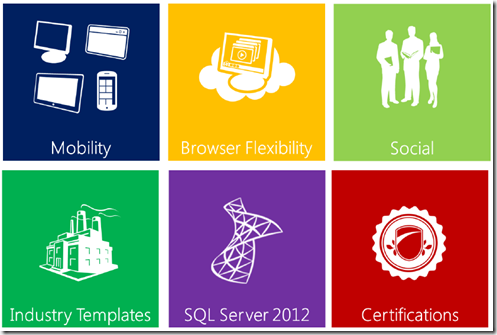
Back in February 2012, Microsoft put out some strong messages regarding the future of Dynamics CRM. Here is a copy of the old roadmap. Here is the summary picture of features to be delivered around the middle of the year.
image

This was very exciting and, like many partners, with new prospects we talked about the new features and when Microsoft expected to deliver them. The top three tiles in the picture are hot topics in CRM at the moment and resonated particularly strongly in presentations.

Then the sad news came in July, at the Worldwide Partner Conference, that some of the features would be delayed six months; mobility and browser flexibility. Official reasons are vague but reasons of ‘quality’ were cited. While I am not at liberty to expand on this what I can say is that the pre-release version, which was available to partners, was received very well and the reasons for the delay come down to coordinating the various components that make up the entire user experience and making sure this experience is the best it can possibly be. In short Microsoft apologised for a delay rather than deliver a frustrating process and disenfranchising customers.

The good news is last week at eXtremeCRM 2012, Microsoft has re-confirmed cross-browser support will be in the end of year update with a revised roadmap due any day now.

In this case, Microsoft made a promise then reset the expectation. Microsoft have communicated a clear deadline on which to deliver their new commitment. The cause, while vague, was some form of failure in the co-ordination of internal processes. Perhaps with better internal collaboration and communication e.g. using Microsoft’s SharePoint and Lync, the messaging to the market would have been set appropriately to begin with, avoiding the disappointment. One hopes Microsoft has learned from the situation and employed process and technology to avoid a repeat situation and to help meet the new deadline.

Case 2: Salesforce and the Social Enterprise

Back in 2011, at Dreamforce, Salesforce CEO Marc Benioff declared 'the “Cloud is dead” and the future is the “Social Enterprise”. What Marc meant by this was organisations will become increasingly reliant on social networks for marketing and will improve internal coordination and collaboration through technology. This was a strong shift in message given Salesforce had been ‘that cloud company’ until this point and was now aiming to become ‘that social enterprise company’. The idea of the ‘social enterprise’ was so strong that Salesforce sought to trademark the term in a number of countries, including USA, UK and Australia.

Unfortunately for Salesforce, the term ‘Social Enterprise’ predated Dreamforce by up to 30 years and meant an organisation devoted “to maximize improvements in human and environmental well-being”. Ironically, Salesforce’s 1/1/1 model is a great example of Salesforce being a traditional social enterprise.

An organisation vehemently opposed to Salesforce’s re-purposing of the term was Social Enterprise UK who established the “Not In Our Name” campaign and used those social channels to get their message out, eventually leading to the writing of an open letter/petition to Marc Benioff signed by various parties including a Nobel Peace Prize laureate.

A couple of weeks prior to the 2012 Dreamforce, at the start of September 2012, fearing protests, Marc announced Salesforce would back down with the quote being:

“It was never our intention to create confusion in the social sector which we have supported since our founding. As a result of the feedback we received, salesforce.com has decided to withdraw its efforts to trademark the term ‘social enterprise’ and plans to discontinue its use in our marketing.”

Salesforce should be applauded for seeing the light on this issue.

However, the removal of the term from marketing has not been as forthcoming. When Dreamforce started, the phrase was still a big part of the show.

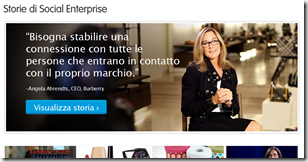
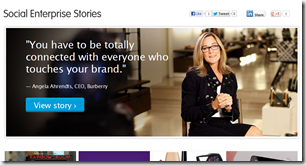
Perhaps the two week lead-up from the removal announcement was not enough time to get the message out to the Dreamforce organisers. However, in the past month, while there have been some measures to remove the term from their marketing, there is still plenty of work to be done. For example, here is the Customer Success Site for different countries.

USA and UK (Customer Stories)

imageimage

Australia, Germany, Italy and Spain (Social Enterprise Stories)
imageimage

imageimage

While Salesforce has changed the header for the USA and UK sites, they have not changed any other country I tried. Burberry may be totally connected but Salesforce’s messaging seems a little fragmented.

In this case I am not sure any more technology other than a cursory web search  and some internal collaboration was needed to avoid the situation in the first place. As for cleaning up the mess, Marc sent a clear message to the market but has only partly delivered on the promise. I can only imagine, in the case of a web page header that the cause is either:

  • A lack of coordination and collaboration i.e. not everyone got the memo
  • A problem with the technology i.e. fragmented systems which are taking time to update
  • A lack of will i.e. Salesforce has no intention of dropping the term from their marketing

I assume one of the first two are to blame. Salesforce could employ collaboration software to help manage the process such as Chatter and Do.com or, if it is the second one, look to use site.com to house all their international web sites rather than, as may be the case, run them on isolated CMS systems. As with Microsoft, I expect Salesforce has reviewed the situation internally and ensured process and technology are in place to reduce the risk of it happening again.

The last option of a lack of will would be truly inauthentic and, given Salesforce understand the consequences of this in a social world, I doubt this is the reason. However, to avoid this perception in the market they should look to addressing the situation as quickly as possible.

Conclusions

No one wants to be thought of as a fraud, inauthentic or untrustworthy. However, even the best of us say one thing to an audience and have to revise our position at a later time. In the cases above, we have two organisations who set themselves a path but found they had to change their direction due to unforeseen circumstances. While tools, such as collaboration software, can help minimise these situations from occurring and be part of the solution for cleaning up the fallout, change is inevitable. The best we can do is learn from the situation and employ technology and process for better control in the future.

Ultimately, the measure of these companies is not that they had to reposition themselves, or the technology they use, but how they handle it. In the case of Microsoft, a new deadline has been set for delivery of the features and they will be measured accordingly. In the case of Salesforce, while a new marketing direction has been locked in, there is still no deadline for when the ‘social enterprise’ phrase will be removed. If they do not set an expectation, their audience will, outside of Salesforce’s control, which is unlikely to end in a positive outcome.

In other words, while technology can help manage our business better and promote internal consistency, we must always consider whether we are being perceived as authentic and this can only come from setting clear, measurable promises and delivering on them (SMART goals). In terms of delivering the features for CRM, Microsoft has done this. In the case of Salesforce, their new goal is not SMART as it is lacking a time component and this needs to be addressed to reduce the risk of damage to their reputation.

Saturday, September 29, 2012

The Selected Item Cannot Be Tracked in Microsoft Dynamics CRM

I had an interesting problem this week. For one project we are at the ‘pointy end’; go-live is upon us and training is underway. The client is loving the Outlook integration and so, while I normally train through the web client, in this case, it was done through the Outlook client.

Everything was going fine. As is often the case there had been some feedback from those in the room regarding their security privileges and what they would need to do in their role and these would need to be tweaked.

At the end of one session one of the users reported not being able to track appointments. Sure enough, they created the appointment in Outlook and when they right-clicked and Tracked, the error reported “The selected item cannot be tracked in Microsoft Dynamics CRM.Item Name=<Appointment Name>”. Usually when there is a security permissions error, the error shown calls this out but this was different.

What was also strange was if I opened the appointment it claimed it would be tracked once it was saved which, of course, it already was. Forcing a CRM sync tried to track the item but produced the usual ‘unable’ error.

Checking the user’s permissions everything checked out. They had User Delete and Create for Activities so they could untrack and had basic access to the Service Calendar entities to allow for the tracking of Appointments.

So I thought I would try to add an appointment and track with the trainer user account, which had System Administrator permissions. The result?

  • If I opened a Contact in CRM and created an appointment, the Outlook form opened, as per user permissions, and everything worked fine
  • If I created an appointment directly in Outlook and tried to track it through right-clicking on it in the calendar (the track button did not appear in the ribbon for it unless I opened the record) it produced the same error

This was a bit of a mystery and resorting to Google/Bing did not yield any joy either.

The Breakthrough

I remembered, back when I was playing with TwInbox that custom items in Outlook could not be tracked to CRM. I also noticed that rather than the usual ‘New Appointment’ button on the calendar in Outlook it read ‘New MeetingConference’, which looked plain wrong.

image(what the button should look like)

A bit of internet searching and chats with the client’s IT folk revealed they had, in fact, used a conference scheduling add-on for Outlook in the past but this had been abandoned quite a while ago. It seemed its legacy was still within their standard operating environment (SOE).

Extensive playing about in Outlook to find the right setting eventually yielded gold. By right-clicking the calendar and selecting “IPM.Appointment” for the ‘When posting’ option, suddenly everything started working as expected.

image

All we needed to do was get the users to apply this setting in future training sessions, fix up those who had been in the class (about ten users) and adjust the SOE. Given the next training session was with the executives, I was glad we had discovered it sooner, rather than later.

Conclusions

Generally, if you cannot track an Outlook item into CRM it is going to be a permissions issue. Some things to check are

  • the Append To privileges for Users, Contacts, Accounts and whatever you want to Set Regarding to
  • Create rights for Activities
  • Appropriate access to the role Service Management privileges so CRM can write the appointment to the Service Calendar (using the privileges of a standard role such as salesperson is a good place to start)
  • User Activity delete permissions if you want the user to be able to untrack and remove from CRM

Failing this, it may be that Outlook is behaving in a non-standard way under the influence of an add-in. If so, see if you can create an Activity from a CRM record using the Outlook forms (this can be set in the user options on the first tab). If this works, given CRM spawns the correct form, it is likely the problem is Outlook has had its default forms messed with and this is where the problems lies.

Good luck and my hope is this post saves you a few hours of heartache troubleshooting Outlook-CRM tracking Winking smile

Saturday, September 22, 2012

Import Tricks For Dynamics CRM 2011

One of my most popular posts is from four years ago, Import Tricks For Dynamics 3.0 and 4.0. Having just done another multi-lingual import for a client, I thought this is a good time to update with my latest discoveries and tricks.

This blog is NOT a review of the features of the import tool as this has already been covered in multiple places elsewhere. This is a few tips and tricks when working with the import tool to make your life a little easier.

Templates and Lookups

A lot of work was done with the Import Wizard in 2011 and it is greatly improved. Back in version 4, there were two ways of getting data into CRM: the Import Wizard and the Data Migration Manager. The version 4 Import Wizard was not as powerful but much easier to use. The Data Migration Manager was a little unfriendly but potentially quite powerful (or so I was told, I always managed to get away with using the version 4 Import Wizard). In 2011, there is no longer a Data Migration Manager but the power of the Import Wizard has greatly improved.

You can now import practically any entity and CRM will provide you an Excel-compatible XML template to use which tells you handy things like field lengths and which fields are mandatory. You can also import lookup fields and link off any unique value you like. For details of both of these features check out this previous blog post of mine.

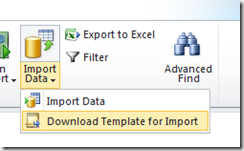
One thing that I will add to my previous post is that, while you can often click the Import Data down triangle and get a template, the behaviour is not always completely consistent.

image

Therefore, if you are having troubles accessing a template for a specific entity, you can always go to Settings – Data Management – Templates For Data Import and download any possible template from there.

image

Information That Cannot Be Imported

Unfortunately it is still not possible to import non-printable characters such as carriage returns and line feeds and these must be stripped out of things like the description text before importing. In my most recent import, the data came from an Oracle source and had SYN signal characters through it which caused no end of grief until they were purged. My old Import Tricks For Dynamics 3.0 and 4.0 post has an Excel formula for removing such characters, once you have identified the column, if this is causing you problems.

While you can now bring in the Owner of the records, you cannot bring in Inactive records (***STOP PRESS*** See Jukka’s comment below for how to work around this). While the template and mapping allow you to select ‘Inactive’ as an option for the Status Reason, the records will fail on import as the Import Wizard assumes all records have a Status of Active and the combination of an Active Status and an Inactive Status Reason is forbidden. My workaround was to create a new Status Reason of ‘Inactive_Temp’ for the Active Status. I also created a workflow which, when a record is created, checks the Status Reason and, if it is ‘Inactive_Temp’, deactivates the record with the Change Status step. This completely automated the importing of inactive records once I had adjusted the mapping to import records with an Inactive Status Reason to be ‘Inactive_Temp’ in CRM.

Another thing that cannot be imported are relationships across N:N links. There is, however, a codeplex project by L33t coder and fellow CRM MVP Andrii Butenko (a33ik) which promises to get around this. I am yet to try it but I do have this requirement on another project so it may come in handy very soon.

The Old Chicken and Egg Problem

One of the problems I mentioned in my previous post was that Accounts and Contacts have a 1:N relationship with each other through the Parent Customer lookup on the Contact and the Primary Contact lookup on the Account. This always caused problems as, with the version 4 Import Wizard, you could link one but not the other. I am now told you can link both (I did not need to do it on this project). The trick is to zip both the Contact source file and the Account source file together and point the Import Wizard to this zip file.

There is also a system mapping for ‘Generic Contact and Account Data’. While I had some difficulties using this (but in the end did not need to) the idea is if you have a big spreadsheet of Contacts, you can use this as a source file to create both the Accounts and the Contacts at once. While untested, I expect if this had a Primary Contact column in it, CRM would do the right thing linking Contacts to Accounts and also populating the Primary Contact field.

Unicode Data

As with version 4, you can still import unicode data, allowing you to populate fields with Chinese, Korean, Japanese or any other unicode text. The xml templates generated by CRM are unicode compliant BUT Excel is really bad at dealing with unicode files. If you plan to save your xml file as, say, CSV, Excel will make this a non-unicode compliant CSV file. The only option you can save the xml file to in Excel and preserve the unicode data is ‘Unicode Text’ which is a tab delimited text file (which the CRM Import Wizard is happy to deal with and was the source format for most of my imports).

One ‘feature’ of Excel 2010 which was very embarrassing was if you double-click a unicode-compliant CSV file generated elsewhere, Excel opens it but strips out the encapsulating double quotes on the first column. The upshot is if the text in the first column contains a comma, this shifts that row’s data out of sync. This was embarrassing in that I was accusing the client of not encapsulating the data properly when it was simply Excel screwing it up. What is more bizarre is that if you open Excel and click File-Open… to access the file (rather than double-clicking the file in the folder) it treats the unicode CSV file properly and does not strip out the encapsulating quotes.

Size Limits

While most of the news with the 2011 Import Wizard is good, one very frustrating feature of the new tool is the source file size limit. Your source files cannot be larger than eight megabytes. This limit is really frustrating, especially with unicode files. You have no choice but to split the files into sets of, say 10,000 records and queue them up for importing. In my case I was only importing in about 100,000 records so while a little annoying it was not a show-stopper.

Here are a few tips for getting your files down below the eight megabyte limit:

  • The XML file, given it contains a lot of metadata about the source fields, is larger than a CSV or Unicode TXT file. Therefore, before importing, try saving your source file in a ‘simpler’ format
  • Delete empty columns as this can save a few hundred kilobytes from the file

Error Export Bug

There is a great feature in the Import Wizard where you can export the rows which failed to import. CRM will package these rows up ready for re-importing once you have sorted out the issue.

image

However, the feature has a bug. In my case one row had caused an error due to a lookup failure. I exported and noticed all the data had shifted relative to the column headers. My culprit was the first column which was the salutation field and this particular record had an empty salutation. Therefore, my suggestion is to ensure whichever column you have first in your source file, make sure it is always populated e.g. the Last Name field for Contacts. Otherwise there is the risk that the data will be corrupted i.e. shifted if you Export Error Rows.

Similarly, I did see occasion where the Import Wizard got confused, when reviewing the import file, by the number of columns because the last column was not completely populated (something that also used to happen in version 4). So I would also recommend the last column in your source file be always populated. Status or Status Reason are good fields for this.

Slowness of Importing

Any tool used to import data into CRM, if it is using supported methods, needs to go through the web service layer. Unfortunately, the web service layer can only insert one record at a time causing a bit of a bottleneck for mass imports. Discussions on the web indicate the best you can hope for is about 50 records per second. If validations come into play or you have a slower server, this can go down to 10 records per second or lower. In my case, depending on server load, I was getting as low as 3-4 records per second in some cases.

I know no way of improving this in any significant way, other than using unsupported import methods i.e. direct SQL writes which I would not recommend given the potential for long-term disaster. It is simply something to be aware of and plan for.

Conclusions

Overall, the 2011 Import Wizard is a great tool and a huge improvement over its predecessor. However, like the previous version, it also has a few peccadillos which can cause headache if you are not aware of them. My hope is, with the above, you can get your data into CRM and avoid too many problems.

Monday, September 10, 2012

Salesforce Second Quarter Results for 2012

You have played the quarterly conference call drinking game now it is time to look at the numbers. Is growth still king or has Salesforce moved its gaze towards reining in its costs?

Where Do I Get My Numbers From?

As usual all number are brought to you from the Salesforce detailed financials PDF. If the numbers in this PDF seem at odds to what you heard on the conference call or in the multitude of lazy media updates, this is because the numbers Salesforce push are their non-GAAP numbers. These are numbers which Salesforce believe more accurately reflect the health of their business but are completely unregulated. The numbers I use are the GAAP (Generally Accepted Accounting Principles) which use conventions enforced across all companies to ensure meaningful comparisons can be made and to ensure a base set of conventions are used across the reporting.

Try and Explain This GAAP/Non-GAAP Thing To Me One More Time

The biggest controversy is when it comes to profit. The non-GAAP revenue Salesforce reports is similar to the GAAP revenue but Salesforce turns its GAAP loss into a healthy non-GAAP profit. How does this work? The fourth page of the PDF tells all. Here is the summary of the big differences:

  • GAAP loss from operations turns into a non-GAAP profit
  • GAAP net loss turns into a non-GAAP net income
  • GAAP Diluted earnings per share goes from a negative to a non-GAAP positive

The big-ticket item that does this transformation is the ‘stock-based expenses’, at $85 million for the quarter.

What is Stock-Based Expense?

This comes from employee options. An option is a right to buy an share at a certain price at some date. In many companies, Salesforce included, options are given to employees to ‘align them’. The logic goes if an employee has the option to buy stock at a certain price, they are motivated to get the share price as high as possible on the date they can ‘exercise’ the option. The logic is reasonable but, as Warren Buffett points out, the difference between an employee option and a shareholder’s share is the employee spent nothing to get it; they have no skin in the game and nothing to lose.

From a GAAP perspective, working out what to do with options is easy. You value the options as if they have been ‘cashed in’ and treat them as an expense. Because the employee will give you money when they do exercise them, you also include the incoming cash in your cash statement. Other than the fact you have more shares in the pool and have therefore diluted the value of each individual share, everything, cash-wise, balances out.

The biggest difference in Salesforce’s GAAP/non-GAAP reporting is this ‘stock-based expense’. I understand the logic: “To see how sales is going, look at the customer transactions, not the employee transactions”. This is well and good but it does not remove the fact that to generate those customer transactions, options were thrown at employees and those options have a value, otherwise they would not have the power to ‘align’.

Salesforce are big at quoting revenue growth, non-GAAP profit and operating cash flow (see buzzword bingo for details). Revenue growth is real and cannot be denied. However, as mentioned in this article, the operating cash flow Salesforce quotes includes the value of the options value as a positive cash value but the non-GAAP profit does not include the expense. In other words, they recognise the money generated from the options in their reporting but not the expense. This is in no way illegal but can, understandably, cause confusion.

The questions to ask are simple: “If Salesforce reports non-GAAP to more accurately reflect the health of their business, why exclude option expense but include the related cash inflows?” and “If Salesforce are using non-GAAP for another purpose, what is it?”

But enough of my soap-boxing and onto the numbers.

Salesforce Made Another Loss (But Not As Big As It Was Last Quarter)

Salesforce halved their loss this quarter going from a loss of almost $20 million last quarter to $9.8 million this quarter but about double what it was for the same quarter last year. No loss is good so hopefully this is Salesforce turning a corner (as suggested by comparison with the previous quarter) rather than descending further into loss.

Salesforce is Starting to Control its Expenses (Sort Of)

image

This shows the percentage year on year growth of revenue (red) and costs (green). Before the start of 2010 (2011 Q1) revenue outpaced costs. Then costs started to blow out until their worst around the middle of 2011 (2012 Q2). This quarter gets us back to where we were two years ago with revenues growing faster than costs. Well done Salesforce. Let us hope this trend continues.

image

Margins, while still in the negatives, are also heading in the right direction, now at –1.34%. Another positive sign, although still negative.

Subscription Speculation

The good news is Microsoft have reported their CRM numbers, now having, as of July 2012, 2.7 million users and 36,000 companies using Dynamics CRM. This means the average company using Dynamics CRM has 75 users, about double my estimated average company size for Salesforce of around 35 users.

My prediction is Microsoft will break through the three million user mark some time around the end of this year (say November to January).

Again, using the Salesforce revenues as a guide, we can estimate the Salesforce subscription base at around 4.9 million users with just shy of 140,000 companies.

The subscription revenue continues to hover around two meaning Salesforce has around twice as many users as Dynamics CRM.

image

However, the actual difference in the subscriber numbers has flattened, although we have seen this flattening before, as per the chart below, just not for such a long period.

image

Conclusions

Salesforce is still on shaky financial ground. They are making a loss, but never talk about it, talking about non-GAAP profits and operational cashflows instead. However, costs are not growing as quickly as they were previously and, with revenues still growing there is the possibility Salesforce will return to profit in the future.

In terms of subscription, Microsoft still has about half the users of Salesforce but the difference is flat at around 2.2 million. It will be interesting to see if this difference reduces in the future.

My thoughts are it would be nice for Salesforce to be consistent in the messages they send out i.e. treat the stock-based expense consistently across their measures but that does not make for rosy numbers. However, even if their outward messages cause confusion there does seem to be an effort internally to control expense. Competition is good so the healthier Salesforce can make themselves financially the better for the consumer. As usual, I look forward to the next quarter to see if Salesforce can return to profitability.

Monday, August 27, 2012

Salesforce Buzzword Bingo

It’s that time of the year again when Santa Benioff delivers us another little present in the form of the quarterly results for Salesforce. I will do the financials (but not this week).

In the past I have tried to summarise what is becoming a dull financial transcript (dull in the sense the numbers are Non-GAAP and there is never reflection on what could be improved e.g. profitability, cost reduction etc.) So I thought I would try something different this time.

Using the historical quarterly update transcripts and an online text analyser we can see the top ten buzzwords in the pre-question monologues of Marc Benioff, CEO and Graham Smith, CFO. I have excluded the safe harbor and Dorothy Dixer questions from the analysts so specific topics raised by analysts do not skew the results. I have also applied my own filter to eliminate things like ‘the’ and ‘year’. Here I present the top 12 keywords. The reason for 12? This way you can put them on a 4x3 grid, grab a bottle of your favourite tipple and, with some mates, play the Salesforce Quarterly Results Drinking Game next quarter.

This Quarter’s Keywords
(total words: 3200)
Last Quarter’s Keywords
(total words: 3200)
Last Year’s Keywords
(total words: 4400)
revenue (39 times) revenue (38 times) social (42 times)
social (21 times) social (32 times) revenue (30 times)
cloud (20 times) cloud (23 times) customers (27 times)
growth (19 times) enterprise (21 times) enterprise (25 times)
cash (17 times) customers (17 times) cloud (25 times)
operating (17 times) sales (14 times) growth (21 times)
service (15 times) cash (13 times) cash (15 times)
enterprise (10 times) service (11 times) sales (13 times)
customers (9 times) customer (11 times) dreamforce (13 times)
dreamforce (9 times) growth (11 times) customer (12 times)
marketing (8 times) operating (10 times) radian6 (12 times)
sales (8 times) eps (8 times) service (10 times)

Key phrases (two words or more) for this quarter included:

  • ‘cash flow’ (mentioned fifteen times)
  • ‘deferred revenue’ (mentioned ten times)
  • ‘operating cash’ (mentioned eight times)
  • ‘revenue growth’ mentioned eight times)
  • ‘revenue run rate’ (mentioned seven times)
  • ‘acquisition of Buddy Media’ (mentioned four times)
  • ‘the undisputed leader in Gartner’s magic quadrant’ (mentioned twice, Forrester was not mentioned funnily enough)

New Topics At the Front of Mind

Obviously cash flow and revenue are the key measures being promoted (which is nothing new really). The recent purchase of Buddy Media rated a mention along with hints of something brewing in combination with Radian6 (maybe we will see something more at Dreamforce). The Gartner results were also pushed a little given Gartner strongly believes in the social vision of Salesforce.

Topics in Decline

  • Social: mentions of social have halved from a year ago, which surprised me. I am wondering if this is a result of the recent #notinourname campaign of Australian and UK not-for-profit organisations which take exception to Salesforce attempting to trademark the term ‘Social Enterprise’.
  • Customers: Marc prefers to cite specific examples of big deals these days which may account for ‘customers’ dropping so significantly in their mentions as a whole. This begs the question whether Salesforce is now focussed on the big deals rather than all customers though.
  • Enterprise: The other half of the phrase ‘social enterprise’, this has also dropped. In fact, the term ‘social enterprise’ has gone from 20 mentions a year ago to less than a third at six mentions today.
  • Mentions of the ‘cloud’ has also reduced but not as much as some of his other key phrases.

The big surprise here for me is the downplay of the ‘social enterprise’ compared to last year. As far as I know, this is still key to the Salesforce strategy and yet it is not being driven home as strongly as it once was.

Topics on the Rise

  • Revenue: Not a huge increase, but an increase anyway. A cynic would suggest they are shouting about revenue to distract from the lack of profits for five quarters in a row. I just think they are talking up the one statistic which makes them look healthy.
  • Service: Most of the mentions of ‘Service’ refer to their Service Cloud offering. I am wondering if something is on the horizon with their service products at the upcoming Dreamforce

Conclusions

From reviewing the transcripts, it seems to me there is a lot to be seen at Dreamforce. There are the possibilities of a marketing and a service product vision (as well as an HR one which is getting a lot of air time at the moment) which is very exciting.

The phrase ‘social enterprise’ appears to be on the decline, which I still cannot fully explain. Is there something new on the horizon for Marc to sell a vision for?

While this could be argued as taking the data too far, there is a reduced focus on ‘customers’ and therefore, potentially, a reduced focus on customers in general. In the past, Salesforce was proud of its efforts to ensure all companies of all sizes could access the Salesforce products and they proudly advertised the fact.  The days, all we hear is ‘Salesforce + <company> = Like’ and the Social Enterprise License Agreement.

Revenue mentions have increased and are likely to continue to dominate the mention tables. Revenue growth looks good (hopefully profits will soon as well) so it makes sense to talk it up.

In conclusion it is fair to say the keywords paint a picture of an organisation at an inflexion point with new products coming soon and old ideas fading as their usefulness dwindles. Similarly they paint a picture of an organisation at an inflexion point in terms of the kinds of customers they pursue. Do they go after the big deals with big household names? Or do they go after smaller deals, as in the past?

The one conclusion that comes through loud and clear is that it is all about revenue and growth and not about profits and sustainability. When I have raised this with Salesforce employees in the past, the answer is always ‘we are pursuing a growth strategy’. I will respond to my thoughts on that when I review the financials in an upcoming blog article.