Sunday, March 17, 2013

The Only Surface Pro Review You Need If You Run Outlook

A little over two weeks ago I bought a Surface Pro, while at the MVP Summit, from the Bellevue Microsoft Store. For the non-Americans reading, the Microsoft Store is like the Apple Store but with Microsoft-related products.

Since then I have read a lot of reviews of the Surface Pro full of nonsense, FUD and ignorance. Here is the review for the rest of us.

Please note this is not a pure Surface Pro review but rather a review of the experience of running the Surface Pro with Windows 8 and Outlook 2013. Given this is a common scenario in the real world, I figured my experiences may be of interest.

My Very Specific Purchase Criteria

I have one primary criterion for any laptop or laptop-like device I purchase and that is it must run Microsoft Outlook and by this I mean in a Windows environment. As the avid ‘Musings’ blog reader will know from here, here and here I live in Outlook both at work and at home. I literally have reminders in my Office 365 Outlook calendar for taking out the garbage and I feel there is no shame in this. Being an MVP, working full time and not completely ignoring my wife and two children takes a lot of organization and Outlook is the perfect tool for me to do this.

The Reason Why Comparisons To Apple Products Are Plain Dumb

The Surface Pro is a touch screen tablet, running Windows 8, on an Intel Processor. It is not a touch screen tablet running an efficient, but less powerful, ARM-like processor like the iPad and it is not a small non-touch screen laptop like the MacBook Air. In theory I could buy a MacBook and dual boot it with Windows 8 but, frankly, Windows 8 has been built for multiple interactions, including touch, so it will always be an inferior result.

Therefore, comparing the Surface Pro to an iPad and complaining about the battery time is like complaining that a pair of scissors make for a lousy hedge pruning experience. This is not taking away from the Apple devices it is just, for my needs, comparisons are, essentially, meaningless.

My Low Benchmark

One final point of clarification. The reason I was upgrading was because my previous laptop, an emachines E627 running Windows 7 and Office 2010 was not cutting it any more. The single core processor meant going from cold start to Outlook was taking around 15 minutes and I could not play YouTube movies without the sound going out of sync or a lot of missing frames. I did not need a lot of muscle but I did need some.

Why Not Other Options Like an Ultrabook?

I went into the Microsoft Store open to any form factor as long as it had a multi-core processor, could run Outlook and had equal or better resolution than my current machine (1366x768; Outlook loves her real estate). The fact is to get an i5 processor with HD resolution in any other machine in the Microsoft Store was costing closer to $1,500. With this mindset, the Surface Pro, even with the Type Keyboard, was a bargain.

Disk Space

Alongside the battery time (which I will get to next), this is probably the biggest ‘smirk point’ the Apple folk have thrown at me when telling them of my purchase. Let us sort this one out straight away. Here is the contents of my hard drive as we speak:

image

Of the 110Gb that comes on the solid state drive, I am using about 60%.

In terms of the programs on the drive, 5Gb is Civilisation 5 (which has a touch-optimized mode and runs like a charm), a little over 1Gb is Office 2013 and about 2.5Gb are Windows apps for ‘Metro’.

In terms of my user profile, 4Gb are the Windows 8 and Office 2013 iso files which boot directly in Windows 8, 6Gb are pictures and videos, synched down from my Lumia 800 via Zune, 4Gb are the OST files for Outlook and 8Gb is general stuff on the desktop I have not yet got around to sorting.

There are two reasons I have no concerns in regards to space on the device. Firstly, if I am storing personal data on the Surface Pro of any significance, I am a fool. This is what cloud storage is for. In buying the Surface Pro I got 3Gb of free storage to add to my existing 25Gb of storage on SkyDrive. Excluding photos and music (which I store elsewhere) this has been sufficient to house all data I hold precious. Office 2013 treats SkyDrive as just another drive so opening or saving to it is simple. For other stuff, you can drag the files directly into SkyDrive in the browser to upload it. The only thing gobbling up my c–drive should be program installs and I already have pretty much everything I need on that front.

The second reason I am not worried about local storage for, say, movies when offline is the Surface Pro comes with a MicroSDXC slot. This can read MicroSD cards up to 2Tb. I have put in a 16Gb one I had lying around (which I still have not touched) and ordered a new 64Gb card from eBay for $30.

I can understand why the Apple folk fear storage because I have seen their panic when their iPhones run out of space and they are away from a computer but, for the Surface Pro, it really is not worth worrying about.

Battery Life

My experience has been to expect a solid four hours from the battery. I have had the Surface Pro on and off today without the power supply and it currently reads “1hr 35 min (39%) remaining”. Doing the maths, this comes out to about four and a half hours total battery life. The only time I am away from a power source for more than a couple of hours is during long haul flights. It is true I could not have had the Surface Pro on the flight back from Summit permanently on without power but the reality was I was asleep for a good four to five hours of the trip, I was watching two or three movies (The Dark Knight Rises is a seriously good film) and reading emails the rest of the time. If I had been pressed into doing some serious work, I had power in the seat. All A380 economy seats and the first ten rows of economy in Delta’s Sydney-LA planes have 100v power available in the seat.

For the way I use my Surface Pro, power is not an issue; I simply do not need ten hours off the grid.

Accessories

Does the old joke about how you milk a sheep apply equally to the Surface Pro? Total accessory purchases to date:

  • Type Keyboard (if you are using the Surface Pro for any kind of typing, you need this, or the Touch Keyboard, but at $130 I do feel a little ‘woolly’. An alternative would be a portable Bluetooth keyboard and cover which can be bought for $10 and $5 on eBay respectively)
  • 64Gb MicroSD card ($30 from eBay)
  • USB 2.0 DVD Drive ($20 from eBay)
  • USB Ethernet connector with 3-port USB hub built in ($7 from eBay)

The Surface Pro appears not to support WiDi so the only other purchase I can see me making is for a Mini DisplayPort to VGA or HDMI convertor. Looking at eBay, I an get one of these and still have change out of five bucks.

Other than that initial outlay for a keyboard, everything else is non-proprietary and cheap. The power port and keyboard port are proprietary but power supplies are running at about $20 on eBay and, unless they provide something amazing like a battery in the keyboard, the current keyboard will suit me fine. Additional styluses can be bought for $30 but I find old Wacom styluses work pretty well (although they do not always register a ‘right click’ via the stylus button).

Retraining For A New Form Factor and Operating System

I took to Windows 8 quite easily. This is due to two factors. Firstly, I had owned a cheap Windows 8 tablet about six months ago for two weeks before I dropped and broke it. The supplier from Alibaba.com was very understanding and offered a refund but my conscience got the better of me and I never bothered.

Secondly, I own a Lumia 800 windows phone. Windows phones set you up nicely for the screen keyboard and the ‘Metro’ face of Windows 8. The rest is figuring out where stuff is and remembering we touch from the sides and mouse from the corners.

In terms of how my behaviours have changed as a result of the form factor, they have been quite pronounced. Firstly, I now take my Surface Pro to work (I never did this with the old laptop). It allows me to process emails while taking public transport and is great for meetings. Secondly, I now find myself interacting with the device in multiple ways, depending on which is the most efficient. For example, I have learnt that to close tabs in Internet Explorer is Control-W because it is too easy to open a new tab, rather than hitting the ‘x’ with a finger and keystrokes are quicker than precise stylus work.

For Outlook 2013, the stylus is sometimes needed. A great example is the social popup for Outlook.

image 

It is that tiny ‘caret’ next to my picture, slightly less than 1mm in height. There is no way my finger is going to nail that without a struggle.

Other than for programs whose mouse-overs do not respond well to the stylus or a finger (Surface Pro treats fingers and the stylus differently and generally ignores palm resting) I hardly ever use the touch pad on the keyboard.

Things That Have Annoyed Me

The Stylus Bug

There is a bug with the stylus. Depending on your power settings, when the machine goes to sleep it can forget to wake up the stylus detection driver. Initially I fixed this by going back to the ‘Balanced’ power setting and rebooting. There have been times when this has not worked. Microsoft’s workaround is to go to Control Panel – Device Manager, go to the ‘Human Interface Devices’, right-click on the listed ‘USB Input Devices’ and, if it does not show ‘Disable’ as an option, uninstall it and reboot. This works but can be annoying (Microsoft have said a fix is coming really soon). I' have taken it one step further and for all those USB Input Devices with no ‘Disable’ option (I have two of them), I have gone to properties and Power Management and un-ticked the save power option.

image

While early days, I have not seen the problem since.

The Type Keyboard

Fellow CRM MVP David Yack whose native American name is “man of few words but great wisdom” recommended the Type keyboard over the Touch and it was good advice. It is true that, as I rest my Pro on the arm of the sofa, occasionally the keyboard will lose connection with the machine and it will miss strokes. That I can live with (and is fixed by going to a hard, flat surface). The real niggle for me is the ‘c’ key. For some reason, while every other key registers regardless of where it is pressed, I have to hit the ‘c’ in the dead center for it to register the stroke. I have not seen others complain about this online so I think it is just me. If there was a Microsoft Store in Sydney, I would get the keyboard replaced but there is not so it is something I must live with, unless Microsoft, so impressed with this review, decide to throw me a bone and a new keyboard. *hint/beg mode off*

The Kick Stand

The kick stand, which holds the screen up, has two positions: closed and open. There is no option to have the screen at multiple angles. This means, as it sits on the arm of my chair, I am adjusting my position to get my head directly in front of it, rather than the other way around. Someone will invent an iPad-like cover, with its ‘stand segments’, which connects to the keyboard port (or loops around it) and they will make a killing. If someone wants to run with this idea all I ask for is a prototype and 10% of the profits in perpetuity.

The Cameras

There is a camera on the front and back but they are only 0.9 mega-pixel from what I can ascertain. This is fine for Skype calls but no good for family snaps. My advice is get a good camera or mobile phone and take the pictures there.

Things That Have Blown Me Away

The big one here is boot time. As mentioned previously, it would take me 15 minutes to go from cold boot to being able to use Outlook on the old machine. This is now down to literally one minute. That is a serious time saver given I will open up the Surface to read email at least twice a day (before work and when the children have gone to bed). The improvement is due to a number of factors including the screamingly fast boot time of Windows 8 (literally a few seconds) and the smarter OST management of Outlook 2013 (it seems to only pull down the past 12 months of content now making for a much smaller OST file).

Windows 8 compatibility also leaves me speechless. I still use Money 94 to manage the handful of shares I own. It worked on Windows 7 and continues to work flawlessly on Windows 8 (I loaded it by sharing the DVD drive from my old laptop). Given the hassles I had stopping apps from crashing on the work iPhone, which was only a couple of years old, and having to install a random app to ‘reset the common files’, I am seriously impressed Microsoft even care enough to maintain this level of support on their software.

Finally, the other thing I am really impressed with is OneNote. I can take the Surface Pro into a meeting, write notes with the stylus, go back to my desk machine and the notes are there ready and waiting in SkyDrive.

Conclusions

I love this device, despite the niggles. It has made me more productive through the shorter bootup time and by giving me a device which I can use on the way to work to read and respond to email (and look at the embedded links and attached files). Even at work it is useful as a meeting note pad via OneNote.

While it is one of the more expensive laptops I have bought (I generally buy end of line cheapies like my emachines), I feel it has been value for money. If you are a heavy user of Outlook and looking for a bang-for-buck machine, in my opinion, this is one of the best.

Saturday, March 9, 2013

Using Dialogs to Make a Mechanical Turk

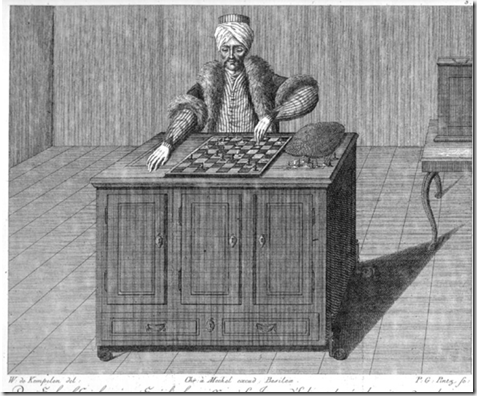
The original ‘Mechanical Turk’ was a machine made in the late 1700s to play chess. Here is the picture from Wikipedia.

image

I do not think the term was supposed to be racist. I think it was designed to conjure up an image of something exotic and the history of chess is tied to the Middle East (although originally from India). I am guessing, to the European courts of the time, Turkey and the Ottoman Empire may have been the most accessible part of the Middle East and, thus, the connection.

The thing is it was a con. It was an elaborate form of the ‘magic box’ act where a person goes in the box and then disappears. In this case the main doors had cogs and bits and pieces inside them and the cabinet had doors on the other side so you could look all the way through but behind the drawers at the bottom was a hidden compartment to hide a person.

The illusion would involve bringing out the machine, showing the inner workings and then challenge an audience member to play a game of chess with it. Once the doors of the cabinet were closed and an audience member selected, the chess master hidden in the bottom would pop up and control the automaton from within. Generally they won the game and the audience would marvel that a machine could rival a human at such a complex pursuit (even IBM’s Deep Blue had human assistance when it beat Kasparov).

The fact is there are some things which are quite difficult for a machine to do which are easier for a human, and vice versa. In using Dialogs in CRM we can get the best of both worlds.

The Problem

The problem my client had was quite simple but difficult to solve in a completely automated way. The client often attended trade shows. From these trade shows they gathered business cards which they intended to bring into their CRM system. However, their CRM system was integrated to other systems, including their accounting system. While the creation of a duplicate Contact was not a big problem and could be handled using CRM’s merging tools, the creation of a duplicate Account (Organisation) would create new records in the remote systems and more of a headache to unravel.

There simply was no way to guarantee a match to an Organisation in the system, due to loose naming conventions, regardless of the clever rules and code we could throw at the system.

The Solution

In this case, a Dialog proved to be a nice way to work around the problem. First of all the user imports all the Contact records. The import does not populate the Parent Organisation, but holds the Organisation name in a custom field on the Contact (Import Organisation Name). The Dialog was then used to process the records. Just like Deep Blue, I got CRM to do the heavy lifting where it could and when it was not sure, fell back to the user.

Here is the Dialog:

image

Looking at the header, you will see I have made this a child process. The reason being the Dialog will go through all Contacts which need an Organisation one at a time and call itself to process the next one. Unlike Workflows, there does not appear to be any problem writing a potentially infinitely looping Dialog.

To call the Dialog, the user simply finds a record they have just imported and runs it from this. The Dialog then uses the ownership information of that record in the first query which, essentially, finds all Contacts where the Import Organisation Name has a value but the Parent Organisation field does not.

The results are then presented to the user in a Page and the user selects the record they wish to process.

A secondary query is then run to try and find a matching Organisation. In this case the query looked for all Organisations in the system where the Organisation Name began with the value of the Import Organisation Name of the selected Contact. Two scenarios then ensue:

  • There are no matches: In which case the system automatically creates a new Organisation, links the selected Contact to it and calls the Dialog again for the user to select a new Contact
  • There is one or more matches: With no hope that CRM can work out which one, all are presented to the user, who selects one. Once selected, the Contact is linked and the Dialog called for the selection of another Contact

So it continues until the user gets through all the Contacts or gets bored and cancels the Dialog knowing they will revisit it later.

I did also add an additional option to the second scenario or presenting a two value question to cover if none of the Organisations presented are a good match. In this case, as with the first option, a new Organisation is created.

Conclusions

Since using this trick a few months ago, other uses have come up, such as for processing event registrations via web forms and newsletter subscriptions. I still hope that things like Queries, Input Arguments and Variables will eventually come to Workflows but, until then, do not discount Dialogs as simply good for call scripting. They are powerful and, like the Mechanical Turk allow us to supplement the limitations of technology with the human factor.

Thursday, February 28, 2013

Reporting From MVP Summit and Answers to your Questions

I try to get out three blog posts per month and, given it is a short month I am therefore writing a blog post while I sit in an MVP session. I generally shy away from doing this as, frankly it is ‘safer’.

Other than telling you I am sitting in a room amongst the greats of CRM listening to the Product Managers of CRM impart their vision and thoughts, my hands are very much tied as to what I can say. Microsoft take the MVP NDA very seriously and I respect that. What I can say is the dialogue between the Product Managers and the MVPS is healthy, robust and respectful and I am proud to be part of it.

CRM MVPs2

My Rules For Answering The Questions

In my last post, I encouraged readers to ask me questions to ask at Summit. While I can say the information provided about CRM now and in the future was comprehensive the rule I must follow is “I can only talk about it if I can find it online” or if I get formal approval. From a practical perspective this means I can mostly talk about Polaris and, to a lesser extent, upcoming releases such as Orion and Leo (http://blogs.perficient.com/microsoft/2013/02/next-4-releases-of-microsoft-dynamics-crm/). The good news is I passed on this blog to the Microsoft product team and have received the formal green light. For additional information, if history is any guide, most of what we learn at Summit comes out at Convergence anyhow Winking smile

The Questions

Ankit Shah asked about:

  • When shall Dynamics CRM support HTML 5?
  • What happens, post-Orion with custom ribbon buttons
  • Is the new Flow UI going to be the end of jscript? What is the alternative for us?
  • Will the internet lead capture be made available internationally?
  • How do we change the goal roll-up system job scheduling time?

Simon Hertzel asked about:

  • The upgrade path from here and beyond and whether fixes will be delivered separately to feature improvements
  • Code parity between online and on-premise
  • The provision of development and test environments for CRM online

Roman Finkel asked about:

  • Can we convert field types rather than delete and re-create fields?
  • Can we have dependent option sets?
  • Can we have online forms?

Jeff Loucks asked:

  • Do you prefer Magiannos or McCormicks?
  • What are the four steak restaurants in Bellevue?

The Answers

Html 5 Support

The Polaris cross-browser client is HTML 5 compatible so you can start developing today. Please note that if your client uses an older browser (or iPad safari) they may not be fully HTML 5 compliant.

Custom Ribbon Buttons

I cannot talk about post-Orion but I can tell you Polaris supports classic form custom buttons by putting them in their own bar at the top of the form.

J-script support in Flow Forms

Polaris ‘Flow UI’ forms have no support for jscript. However, as stated here (http://niiranen.eu/crm/2013/02/extreme-crm-2013-rome-takeaways/ ) it is intended for Orion to bring back form scripting.

Internet Lead Capture Form

I have no information to share on the availability of the internet capture form, or any web form in the product.

Goal Roll-up Scheduling Time

Similarly I have nothing to share on this one, sorry.

Upgrade Path and the Delivery of Fixes vs Updates

Again, Extreme 2013 comes through with the goods (http://niiranen.eu/crm/2013/02/extreme-crm-2013-rome-takeaways/ ). Bob confirmed that fixes would be delivered as rollups and these would NOT contain feature updates, which will, therefore, need to be delivered separately.

Code Parity

Reading between the lines of this (http://vizbqma.msdynamicsworld.com/story/microsoft-dynamics-crm-ur12-and-polaris-clarifying-differences-community), this (http://niiranen.eu/crm/2013/02/extreme-crm-2013-rome-takeaways/) and this (http://community.dynamics.com/product/crm/crmtechnical/b/microsoftdynamicscrmco/archive/2013/02/10/microsoft-dynamics-crm-2011-extremecrm-day2-3.aspx) suggests Microsoft is adopting an ‘online first’ policy with on-premise catching up annually.

Provision of Test and Development Environments

According to this (http://blogs.technet.com/b/lystavlen/archive/2012/11/21/multiple-instances-in-the-upcoming-release-of-crm-online.aspx) Office 365 allows for multiple instances but charges a monthly fee, as feared by Simon. If the amount is $500+ as suggested my Simon in his original post to me, this would be difficult to maintain when a system is on-going for a small business. In fact, it may be cheaper to fire up a new Office 365 account, add in a couple of users for testing and pay for it this way i.e. $50 per user per month or thereabouts. There may even be an option of firing up an ‘on-premise’ version on a cloud IaaS with an MSDN license, if it is for development.

Field Type Conversion

Nothing to share on this.

Dependant Option Sets

The simplest way of achieving this today is with filtered lookups as per my article here. For now it makes sense to stick with that.

Online Forms

Nothing to share on this.

Magianno’s or McCormicks?

Personally, I would take McCormicks every time.

The Four Steakhouses of the Apocalypse

This is a trick question as there are, according to Bing, five of them (http://www.bing.com/entities/search?q=bellevue+steak+house&filters=segment%3a%22local%22&pc=CMNTDF&src=IE-SearchBox&qpvt=bellevue+steak+house&FORM=MAPAGG)

Conclusions

There are a lot of interesting things that have been happening in the release of Polaris and all indications are it is not letting up in Orion. We are, indeed, living in interesting times.

Tuesday, February 26, 2013

Head, Heart and Hands: Setting Up Your Team For Success

Apologies for the slow posting this month. I do have a blog post written answering all questions sent for Summit which is with Microsoft for the green light (I do not want to lose my MVP status due to a misplaced sentence) which I intend to post before the end of the month i.e. in a few days.

In the interim here is another ‘management’ post about setting up your team for success. I am also using my new Surface Pro to type this on so we will see how that goes.

Motivation Theories

I did an MBA about ten years ago and learned a bunch of ways to encourage people to do things you need them to do and set it up so they actually enjoy it. You learn how to divine what gets them out of bed in the morning and whether a dinner out with their partner or a bag of cash is going to get the best results.

Of the various theories we covered, one has stuck with me and is quite easy to use. It is Kehr’s Compensatory Model (http://www.tu-chemnitz.de/phil/psych/professuren/sozpsy/Abstracts/2004-Kehr-Motivation-Volition.pdf). The paper is quite academic so feel free to  move to the pretty picture on page 12.

image

The author of this paper was my lecturer which was HIS motivation for teaching it.

Essentially, people are driven by Implicit motives (what is in their heart), Explicit motives (what is in their head) and Perceived abilities (hands/what they believe they can do).

For effortless achievement (the ‘flow experience’, similar to Csikszentmihalyi’s concept of ‘the zone’), all three must be in alignment.

As an example of misalignment, alignment of Explicit and Perceived abilities means someone can do something but their heart may not be in it. An example may be giving up smoking. Our head tells us it is good for us and we certainly have the ability but if our heart is not in it, it simply will not happen without a lot of willpower (volition).


Using The Model

How I use this model is in one-on-one meetings. By discussing what gives people passion (heart), where they want to go with their career (head) and whether they have the tools to do their job (hands) identifies what is blocking them from doing the best job they can.

To be honest it feels a little weird being in a small room and trying to pry the innermost thoughts of my team out in the open but using a model like this adds a level of formalism which makes it easier.

Addressing the Gaps

Let us say the person has passion (heart) and they are heading where they want to go in their career (head) but their skills are not quite up to scratch or they do not have access to the information they need (hands). This is addressed with things like training, mentoring or setting up better information systems.

If the heart is lacking i.e. their career is on track and they have the tools they need but they are going through the motions, perhaps a better understanding of their needs is required, perhaps there needs to be more fun in the workplace or perhaps they have fears which need to be addressed.

If the head is lacking i.e. they love their work and they have the tools they need but they lack direction, this can be addressed by giving them a vision to work towards, setting clear goals or removing goal conflicts.

Conclusions

If you are managing a team and have one-on-ones with them (perhaps it is the annual appraisal), Kehr’s model provides a useful framework for starting a conversation about what is working well and, more importantly, what is in the way. It also then gives guidance on how to address these problems. Unlike other models it is also easy to explain so your team understand the framework and appreciate what you are trying to do. Good luck.

Sunday, February 10, 2013

Bad CRM Security Habits To Break

This time next week I will be on a plane heading to the MVP Summit at Seattle/Bellevue/Redmond. So, if you have any questions for the Microsoft Dynamics CRM Team in Redmond, feel free to add them below. I promise to ask all the questions you post (even the cheeky ones) and, for the answers which do not get me kicked out of the MVP programme, I will post the responses.

To the blog. There are some bad habits, when it comes to security, which are a remnant of previous versions of CRM (and from just doing things to cut corners when under pressure). I will show you what they are, why they are “poor man’s security” and the better approach.

Hiding Fields

Before CRM 2011, there was NO comprehensive field level security. Essentially, if you had access to the record, you had access to all the fields on the form. There was no way to let one user see a field on a record and guarantee another user could not see it. You could work around things a little bit with things like using jscript to hide tabs or hide fields on the form but you could always add the field as a column in an Advanced Find and see its contents this way. Even if the Searchable property is marked to ‘No’ this just means the field is not available as a condition for the Advanced find; it is still available as a column.

A cursory search on the internet generates many claims of field level security for CRM 4. There is even a Microsoft white paper on the ‘workarounds’ for version 4 which describes how plug-ins can be used to block the Advanced Find workaround above. However, the paper acknowledges the plug-ins cannot intercept access to the Filtered Views, as is done with Dynamic Excel exports.

Therefore, even the commercial products on the market at the time claiming field level security , unless they knew more than Microsoft themselves, either used unsupported methods or were not complete.

In my experience of CRM implementations back then, given the option of a comprehensive (and expensive) plug-in solution or some cheap jscript which was not airtight but did a rough job of it, the client picked the jscript every time. These systems are now being upgraded to CRM 2011 and, frankly, there is no excuse for this nonsense in a CRM 2011 system.

The Better Option for Fields

In CRM 2011 we now have proper field level security. When configuring the field, you tick the box.

image

Then you set up a security profile and say which users or teams can access it.

image

Ideally, in my opinion, the security profiles should be linked to a security role, rather than a user/team, to simplify on-going administration maintenance (users come and go but roles remain) but, given we had nothing before, this is a vast improvement.

Hiding Entities and Poor Assumptions

This section covers a couple of entity security sins. Firstly, the obvious one. With the sitemap, it was always possible to ‘hide’ entities by editing the XML. After all, if a user cannot click on the entity, they cannot access it, right? The second sin is the poor assumption that entity security ends with configuring user access via the security roles. For example, if we want to secure activities, all we need to do is set up our Business Units and set up the correct security roles, right?

The answer in both cases is, surprisingly (especially in the second case), “no”. Again, the CRM hacker’s favourite tool, Advanced Find undoes our good intentions.

In the first example, the Advanced Find lets us access all entities (even ones not linked to any other entity e.g. configuration setting entities, or in the sitemap). In the second example, while it is true we cannot access the activities (CRM security is sufficiently robust for that), we can access the child records such as notes. If there are good reasons to secure appointments, it is a fair bet that the same rules need to be applied to notes. If not, a user could pull up Advanced Find and access all the note records in the system and probably access inappropriate information. When setting up security, never forget the child entities, especially notes.

Conclusions

Security configuration in CRM has come a long way from version 4 but some habits die hard. Field level security should not be confused with user experience design and, now the tools are there to set field level security properly, they should be used. Also, when considering the security required to meet a business’ needs, think of the information being held, not just the entities otherwise notes will trip you up every time.

Good luck.

Monday, January 28, 2013

Monitoring the Skills of Your CRM Team

This is another one of those ‘CRM manager’ posts that occasionally sneak in, mainly because I am running the local CRM team now. However, it is a tool even a member of a team could use to see where the weaknesses in their team are and decide whether to up-skill themselves or, at least, raise it with management to score some points with the boss. In my case I used it as part of my 12 Month Plan for the CRM team.

As the title suggests, this tool is about monitoring the skills of a CRM team to ensure there is a healthy mix for when projects come along or to mitigate the ‘under the bus’ factor.

The Under The Bus Factor

Also known as the ‘win the lottery’ factor, this is a nice way of talking about staff contingency; if you only have one person who can code and they get head-hunted you are either hiring really quickly (a good recipe for getting someone who is not a great fit for the business) or outsourcing and losing profits. In my opinion, having at least two people who can perform an essential skill as well as each other saves a lot of headaches. Not only do they often bring different wisdom and experience to the table, making the sum greater than the parts, but it provides a way to quality check each other’s work.

The Essential Skills For CRM

In my experience, there are three broad categories of CRM consultant:

  • Functional Consultants
  • Developers
  • Infrastructure Experts

Functional Consultants (which is where I place myself) know how the product works from a user’s perspective. They are often the most client-facing of the consultants and conduct things like workshops, deliver training and the like.

Developers are the ones who stretch the product beyond what the Functional Consultant can deliver; when the client insists on a specific piece of functionality and it simply cannot be configured and be practical through settings, the developer comes in to show what the underlying platform can do.

The Infrastructure Experts are the ones who love to design server configurations to make systems sing. Setting up clusters and farms is their thing and they get excited when a client asks for ‘high availability’ because it means they can throw everything they have got at the problem. Even as CRM deployments go ‘in the cloud’ there is the need for an Infrastructure Expert so ensure things work on the client’s side and to ensure the cloud CRM deployment effectively works with local, non-cloud applications.

Often they are also the ones who actually install and set up the base platform.

Despite using three categories, they are not mutually exclusive; there are developers who can deliver training, for example. However, in my experience, consultants have one of these as their primary skill and perhaps a second as a secondary skill. Their primary skill is their key strength but they dabble in other areas.

The Skills Matrix

So let us say we have a CRM team of three: Tom, Dick and Harry. We can assess them or they can assess themselves in terms of the three categories, putting a ‘P’ for primary or an ‘S’ for secondary in front of each skill. I quite like the idea of self-assessment because when it comes to a project and that skill is needed, they have taken ownership for delivering that aspect of the project by stating they are an expert in that skill.

Maybe we end up with a matrix like this:

  Tom Dick Harry
Functional P   P
Developer S P  
Infrastructure   S S

In other words we have Tom and Harry the Functional Consultants and Dick the Developer. Finding the strengths and weaknesses of the team is then a case of reading across the rows and assigning a numerical value to the letters, if you choose. In this case, it is fairly clear the team has a weakness in infrastructure knowledge.

The decision is then:

  • Focus on projects with limited infrastructure challenges
  • Up-skill an existing member of the team
  • Bring in a new person, Jane, whose primary skill is infrastructure configuration

The Expanded Skills Matrix

In the case of my 12 month plan, I expanded these skills out to:

  • Conducting Requirement Workshops
  • Presales Demonstration
  • Documentation
  • CRM Configuration (no code)
  • Training
  • Client-Side/Form scripting (j-script)
  • Server-Side coding (.Net)
  • Infrastructure Design
  • Implementation Setup

From the resultant matrix it became clear where the team was strong and where there was room for improvement. This information then fed into the plan for the team in terms of hiring and training.

I am sure, as the product changes, this expanded list will evolve. It is possible that html5 skills will be needed in the future, as Silverlight skills are needed today. This may be rolled into the Server-side coding bucket or be listed as a skill in its own right.

Conclusions

Whether you are managing a CRM team or are part of one, a skills matrix can give you a quick picture of how the team stacks up in terms of delivering projects. One aspect I like of this approach is it is relatively simple for team members to self-assess. Nothing generates groans faster than asking a team to fill in a skills assessment but by fixing the categories and giving them a simple ‘P’ or ‘S’ scoring system, they should be done in five minutes without too much difficulty.

Monday, January 21, 2013

Book Review: Packt Microsoft Dynamics CRM 2011 Customization & Configuration (MB2-866) Certification Guide


Introduction and Disclaimer

As they did this time last year, Packt have asked me to review one of their online books in exchange for a free download of it. Again, if you are interested in buying it, here is the link.

image

I have known the author, Neil Benson, online and offline for at least a couple of years with most of our real world contact happening at the MVP Summit.

He is a man I have a great amount of respect for and demonstrates he is a man of refined tastes in two ways:

  • he has partnered up with an Australian woman
  • he has a passion for excellent scotch

As with the last Packt review, the timing of the review is impeccable. The MVP Summit is less than a month away and I am sure there is a wee dram or two in it for a complimentary review. Despite such excellent prospects, I will try to be as impartial as I can.

The Microsoft Certification Process

The Microsoft certification process is an interesting quirk of working with Microsoft products. The idea is certification demonstrates familiarity and knowledge of the product. In theory it shows a level of expertise in a specific product beyond that of the uncertified. Neil talks about this in the preface.

In reality, while the Microsoft Official Curriculum (MOC) and course are excellent for learning an aspect of a Microsoft product, one can put the exam code (in this case “MB2-866”) into a search engine and find “Actual Tests” for less than, say, the cost of this e-book I am reviewing. These are very similar to the tests given for certification and the unscrupulous could easily memorize the answers to 80 specific questions and pass without any real-world experience with a product.

A couple of factors encourage this poor behavior. Firstly, Microsoft recently changed the rules for organizations to be a certified gold or silver partner with them. One part of the criteria is a certain number of certified staff. With time being money, this puts pressure on organisations to take ‘short cuts’.

The second factor is the nature of the questions. In my case I received training on Dynamics CRM back when it was Microsoft CRM 1.0 beta. I have consulted with the product since v3.0. However, despite implementing many CRM 2011 projects and being considered an expert with the product, I still fear not being able to pass the exams. Why? Because the questions are written to trip you up or they cover aspects of the product which are easy to discover when it is front of you but are not often memorized. For example, a configuration question could be “What is the default starting value for custom option sets?” Off the top of my head I have no idea. Do I know how to find out with the product in front of me? Sure. Have I ever needed to know this? No, but it is a legitimate question in the sense that it relates to the product and has a well-defined answer.

Am I suggesting you ignore books such as this one and get a '”brain dump”? Not at all. If you need to “tick the box” it is an option, but if you are working with a product (Dynamics CRM) in the capacity the exam covers (customization and configuration) a brain dump will do you no favours. If you are studying to work with a product, get the MOC materials, do a MOC course or get a “MOC-proxy” such as this one. If you are nervous even after studying, there is always the option of ‘sanity checking’ your knowledge with a test exam but I never recommend they be used, even to my staff, for anything other than to uncover weaknesses in an already established body of knowledge.

Finally, the MB2-866 exam is not a coders exam, despite the title. In this case, customization and configuration refers to setting up the environment e.g. configuring audits and currencies and modifying the system through the interface without code e.g. adding new fields or forms. The skills tested are those required to do things like set up pre-sales demos, configure a system ready for coding or provide on-site ad hoc modifications to a client.

The Reviewers

The four reviewers for the book are:

  • Michael Ferreira
  • Joel Lindstrom
  • Tanguy Touzard
  • Jerry Weinstock

I do not believe I have met Michael but I know the other three very well and even shared a room with Tanguy at last year’s MVP Summit. What I can say about these gentlemen is they are all existing or former MVPs so they know the product and value their reputation (given this is the measure by which we get renewed). They have strong reasons to make sure this book is as good as it can be.

Overview and Structure of the Book

The book is just over 300 pages. The chapters are:

  • Preface
  • Chapter 1: Overview of Microsoft Dynamics CRM 2011
  • Chapter 2: Configuring the System Settings
  • Chapter 3: Configuring the Organization Structure
  • Chapter 4: Entity an Attribute Customization
  • Chapter 5: Data Modeling Using Entity Relationships
  • Chapter 6: User Interface Customization: Forms, Views and Charts
  • Chapter 7: Auditing
  • Chapter 8: Solutions
  • Chapter 9: Sample Certification Exam Questions
  • Appendix A: Answers to Sample Certification Exam Questions
  • Appendix B: Answers to the Self-test Questions
  • Appendix C: Introduction to Microsoft CRM Training and Certification

If we compare the size to, say, Matt Wittemann’s CRM 2011 Administration Bible, we see it is about half the size (although the last 100 pages cover preparation and a sample exam, rather than exam content). However, this one is a lot more focussed, covering only the topics needed for the exam e.g. installation is not covered here but is in Matt’s book. Using Matt’s as a benchmark it seems, in the areas it covers, this one is quite comprehensive.

Preface

The exam syllabus link in the document did not work for me, but you can get an overview of the exam here:

http://www.microsoft.com/learning/en/us/exam.aspx?id=mb2-866

From this, we see the topics covered in the exam are:

  • Configuring a Microsoft Dynamics CRM Organizational Structure
  • Managing Users & Teams and Security
  • Customizing Attributes and Entities
  • Customizing Relationships and Mappings
  • Configuring Auditing
  • Managing Forms, Views, and Charts
  • Implementing a Microsoft Dynamics CRM Solution

which closely mirrors the chapters in our book.

The preface is clear this is a book of what you need to know, rather than a book of best practices, such as the CRM Field Guide (plug, plug) which Neil was also an author for (as was I). This being said he does slip in the odd best practice where it makes sense.

The preface explains there is a “Test Your Knowledge” section at the end of each chapter and a sample 75-question test exam at the end of the book. The preface is also crystal clear that this test exam is NOT a brain dump but simply an exam in the same style as the official one.

While no guarantees are given, Neil makes it clear that he firmly believes learning the content of the book is sufficient to pass the exam.

The preface gives a brief description of the chapters (which I purposely skipped over so I can give you my own overview without interference) and outlines what you need in addition to the book i.e. a working CRM environment to play in.

All good so far…

Chapter 1: Overview of Microsoft Dynamics CRM 2011

This chapter covers areas including:

  • The technical architecture of CRM (in a way that means even I now understand what multi-tier architecture is)
  • Supported and unsupported customisations. This is about as technical as you need to go for the exam. In short, while no coding knowledge is really required, it suggests you do need to know where that code can be applied and what layers of the architecture can be modified. The reason for this? If you are designing a CRM system, you need to know where codeless changes end and coded changes begin and the broad limits of what code can so in a supported fashion
  • Deployment options (and their differences)
  • Customization security roles (system administrator and customizer and the difference between them)

There is also a nice summary of the chapter at the end (and at the end of all the chapters). If you are already knowledgeable about CRM and want to know if it is worth reading a chapter, this summary could be a good place to start; If you learn something new, the chapter might be worth the effort.

There is no ‘Test Your Knowledge’ section for Chapter 1 which makes me wonder whether this is examinable or not. Either way, it is a good foundation for CRM in general and the content that follows.

Chapter 2: Configuring the System Settings

This chapter begins with a blow-by-blow review of the system settings you can set for CRM. This is quite dry but absolutely necessary for an exam e.g. can the report categories be modified and how?

The chapter then gives some context to the settings in terms of Outlook and even covers the options a user can set for the Outlook client.

Finally, the chapter talks about which settings can be bundled into a solution and migrated to another CRM system.

Probably not a chapter to read if you are sleepy but comprehensive none the less.

Chapter 3: Configuring the Organization Structure

This is, essentially, the security chapter and it is quite a large topic these days given security is affected by:

  • Business unit structure
  • Record ownership (user or team)
  • Security role setup
  • Field security settings
  • Form security

All these elements must come together in a CRM solution to ensure the right information is delivered to the right people and sensitive information is contained, as required. This is not a trivial topic to cover and is much more complicated than it was back in the version 4 days.

What I do like is Neil’s emphasis that the business unit structure is not there to reflect the real divisions in the organization but is there to manage security. Too often people set up business units for no better reason than it reflects the org. chart. Keeping it simple and setting it up purely to manage security needs will always pay dividends in the long run.

In terms of licensing, Neil is clear; he sticks to what you need to know, no more. As he correctly points out, with all the deployment options, licensing is a complex beast (to the extent there are organisations out there whose sole purpose it to provide advice to ensure you are correctly licensed with Microsoft products).

He covers one of the more complex aspects of the 2011 security model: team ownership. Even the most battle-hardened CRM veteran gets tripped up by this so it is good to see a no-nonsense summary.

Security role setup is covered and, again, a few best practice tips are given e.g. “copy a role, do not create from scratch”. Neil also covers the behaviour of security roles when they are assigned to users.

Finally, Neil covers what is left e.g. things like form security.

In terms of a text summary of CRM 2011 security, this is one of the best I have seen. Whenever I am asked by a client to describe security in CRM, a shiver of dread runs through me. Neil has tackled the job and made it seem effortless. This chapter and a trial instance of CRM and you will be a CRM security guru.

Chapter 4: Entity and Attribute Customization

For me, this is the core of CRM customization. In transforming an out-of-the-box CRM system to a practical system, I believe getting the data structures right and setting up the fields right is essential. This chapter covers the creation of the entities that make up those structures and their fields (linking the entities comes in Chapter 5).

Neil provides a comprehensive review of entity settings and a few more best practice tips. He even talks about where the official courseware is in error and where exam questions may also be in error to match.

He then moves into custom fields (he even explains the difference between decimals and floats and what IME Mode is).

Field level security is covered as is option sets (local and global).

A good high-level review of entities and fields. Again, with a demo system to practice with, this provides the foundation for a good working knowledge for the exam.

Chapter 5: Data Modeling Using Entity Relationships

Neil talks about the kinds of relationships that are permitted and those that are not (fight the good ‘polymorphic’ fight, Neil). He goes into detail such as cascading behaviors and mappings. Finally he talks about ad hoc modelling (Connections).

Again, a good introduction to entity linking which covers the basics for an exam.

Chapter 6: User Interface Customization: Forms, Views and Charts

Moving from the backend structures, Neil now moves into modifying the front end. Firstly, he covers form modification (mobile and client and even calls out read-optimized forms) and form security (answering why role-based forms are not secure).

He then moves into describing the various views used in CRM and how to create new ones.

Finally, he talks about chart creation, how to add them to entities and gives a great table showing the different types of charts with a handy graphic for each one. He also covers exporting and importing charts for customization but, as this is beyond the scope of the exam, does not cover their customization in detail.

An excellent overview covering the essentials.

Chapter 7: Auditing

Neil talks about what the auditing function monitors and some of the limitations of in within CRM. He covers audit configuration and audit security.

A relatively simple chapter but one that covers all aspects of auditing in CRM.

Chapter 8: Solutions

Chapter 8 is the last of the ‘content chapters’. The last chapter and appendices covering the sample exam and preparation information. The idea of a solution is new to CRM 2011 and is a complex subject. However, Neil navigates the essentials with deft elegance, clearly explaining the difference between managed and unmanaged solutions when it comes to deletion and application to a new environment. Neil even provides mnemonics to help the reader remember some of the trickier aspects for solution conflict resolution.

Solutions are complicated to the point many of us avoid using managed solutions unless absolutely necessary and generally not worrying too much about them. However, such an attitude does not pass exams. Neil covers what you need to know to pass the exam and with a bit of practice on a demo environment or two, the behaviour should become a little more intuitive.

Chapter 9: Sample Certification Exam Questions

This is a set of 75 exam questions cast in the format commonly seen in Microsoft exams. While the format mimics the Microsoft exam, the wording in these questions, at least to me, seems clearer than the real thing. However, given the adrenaline that is often running through one’s system when doing a real certification exam, this perception may be biased.

Appendix A: Answers to Sample Certification Exam Questions

These are the answers to the questions in Chapter 9. Neil also provides detailed answers as to why the incorrect options are wrong.

Appendix B: Answers to the Self-test Questions

These are the answers to the ‘Test Your Knowledge’ sections at the end of each chapter. No detailed explanations are given here but one assumes you can always refer back tot he chapter to see the reason for a bad selection.

Appendix C: Introduction to Microsoft Dynamics CRM Training and Certification

This initially gives an overview of the certification courses and exams available for CRM 2011. It then provides one of the most useful sections in the book; a guide to exam preparation, a review of how to book the exam and a summary of what to expect in the exam taking. Neil also includes tips on making the best use of your time in the exam.

Finally there is an index for quick reference.

Conclusions

If you cannot attend the official curriculum course and/or get hold of the MOC materials, this is an excellent substitute. It could also be used to supplement the MOC materials to ensure a completely thorough knowledge of the subject as well as providing some good tips when in the real world.

Overall, I am impressed with the effort Neil has put in. Adding nice touches like Appendix C and the test exam make for a more complete document than, say, the MOC material alone. He has also put in the effort of calling out changes implemented in CRM via rollup updates (and likely to be in your test system) but which were not available at the time the exam was put together.

If you are looking for a cheap version of an administrator’s guide, this is not the book for you. It is very focussed in its coverage and is more intent on teaching the how to modify functionality in CRM than in providing consulting excellence advice. The only question that really matters is whether this book will help someone prepare for the Microsoft exam. In my opinion the answer is an emphatic “yes”. Neil covers all aspects called out as being part of the exam and provides real world guidance for when the reader applies their knowledge in the wild. He also provides advice on maximizing your chances for success when in the actual exam. If you are preparing for the MB2-866 exam, simply put, this is money well spent and complimentary to the other tools usually employed (MOC materials and brain dumps).

If you are keen to give your knowledge a good working out prior to sitting the exam, Neil’s book can only assist. The “Test Your Knowledge” sections and sample exam ensure your knowledge is everything it can be prior to sitting for certification. If you are about to sit MB2-866, good luck.